
第四章 I2C:协议、读写数据与 OLED 显示
4.1 [I2C]基本电路结构
串口的缺点
一个串口只能对接一个串口设备
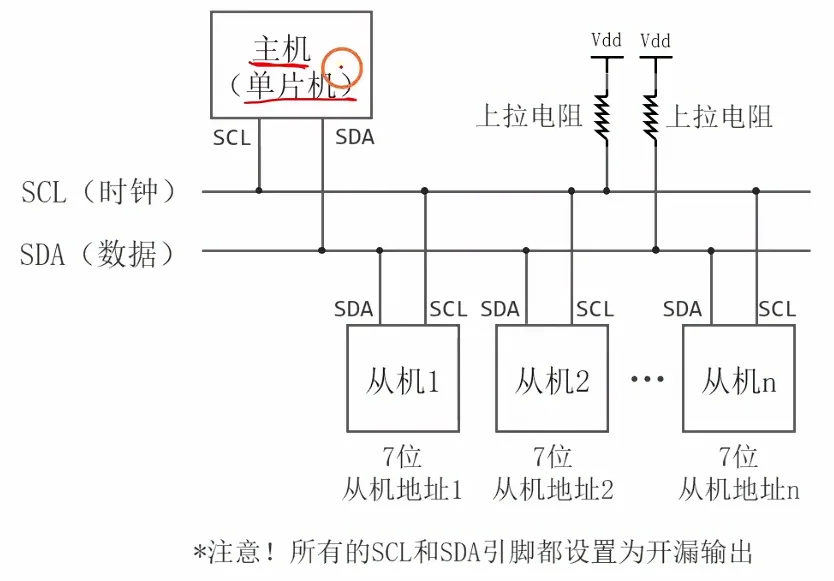
I2C总线的电路结构
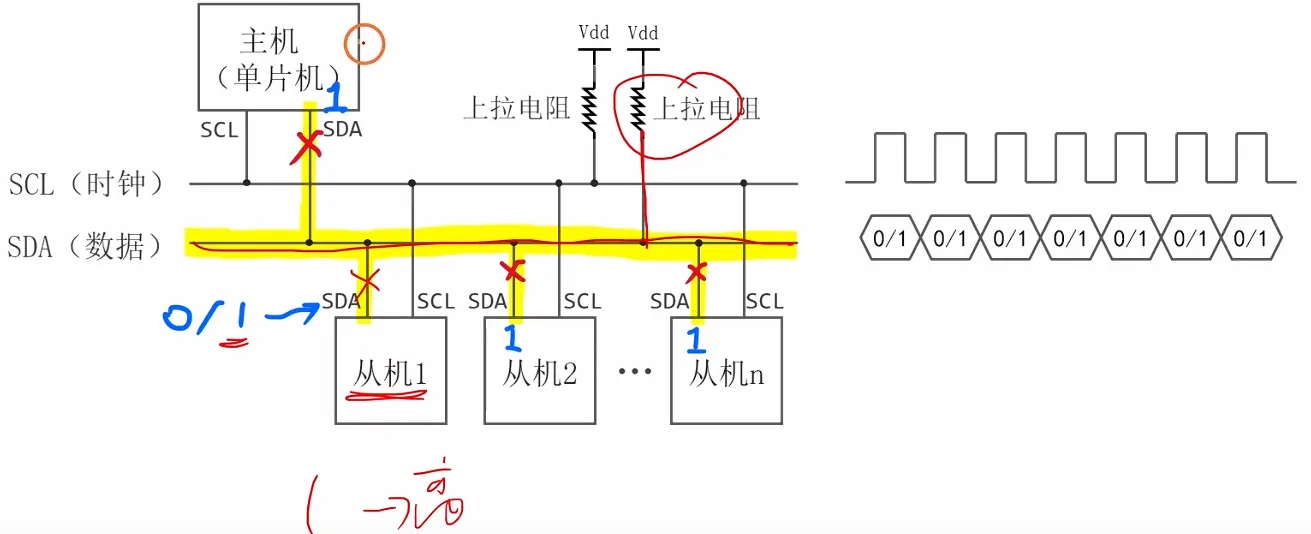
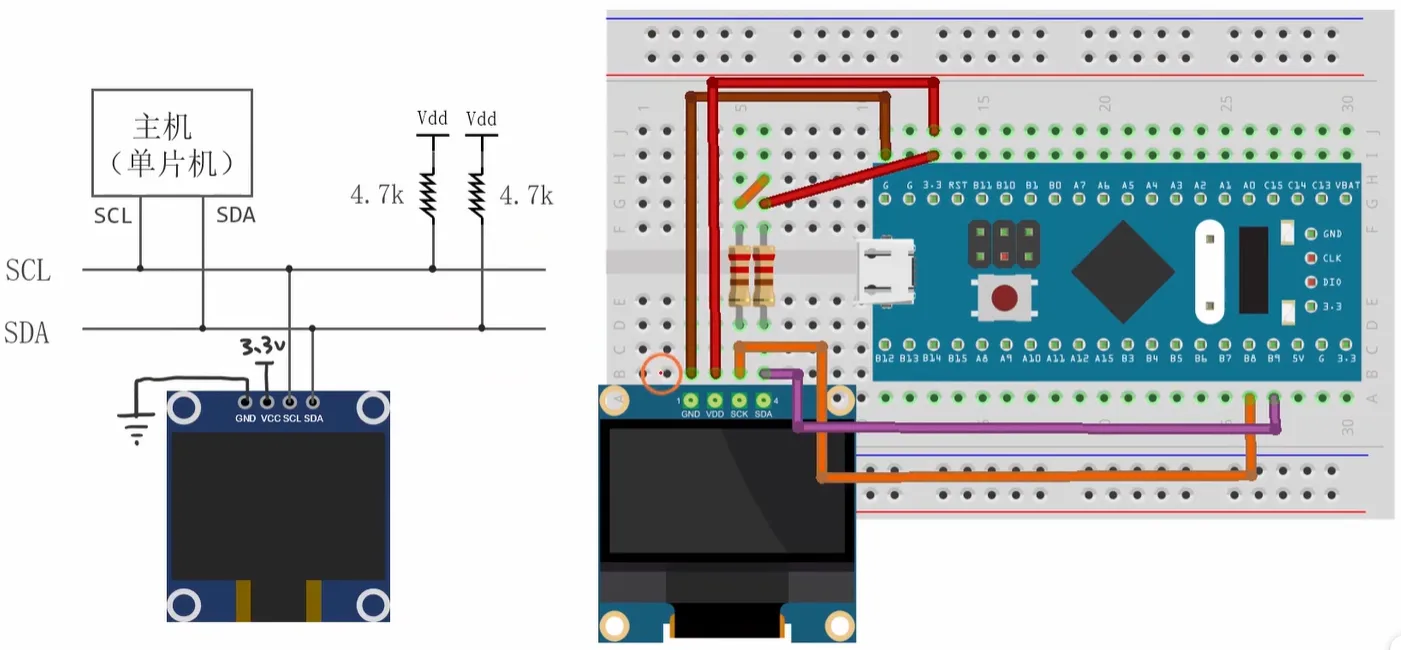
- 总线结构:由 SCL(串行时钟线) 和 SDA(串行数据线) 两条线组成,支持多主机多从机架构,图中为主机(单片机)与多个从机通信。
- 硬件配置:
- 所有设备的 SCL 和 SDA 引脚必须设置为 开漏输出 模式。
- SCL 和 SDA 总线需要通过上拉电阻连接到 Vdd,以保证总线空闲时为高电平。
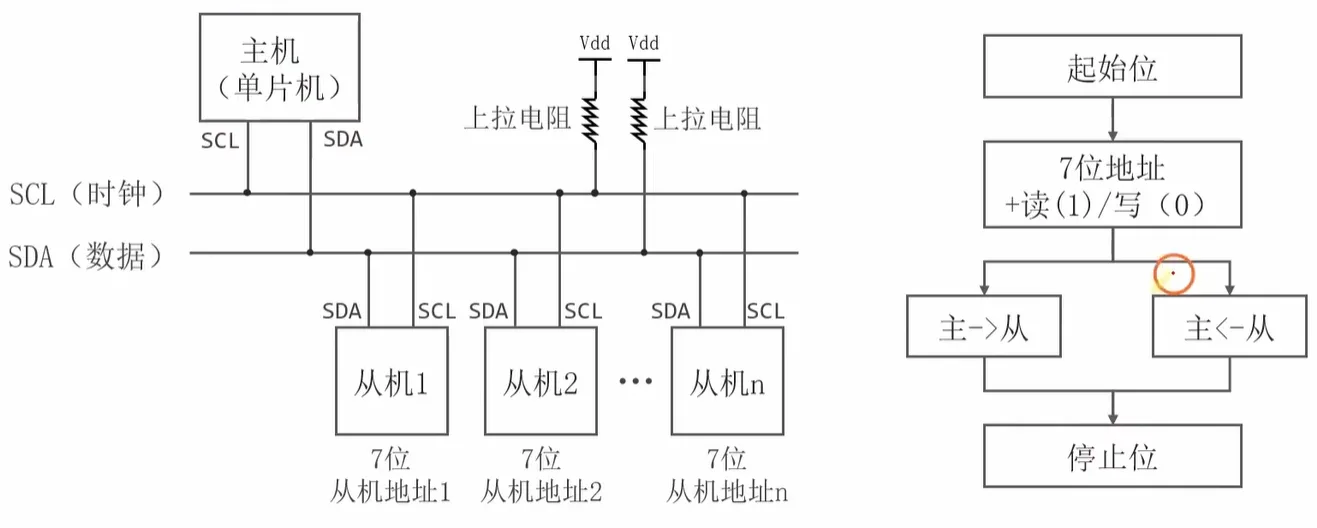
- 从机寻址:每个从机设备拥有唯一的 7 位从机地址,主机通过地址来选择要通信的目标从机。
- 通信原理:主机控制 SCL 提供时钟信号,SDA 用于双向数据传输,实现主机与指定从机之间的数据交互。
数据线和时钟线
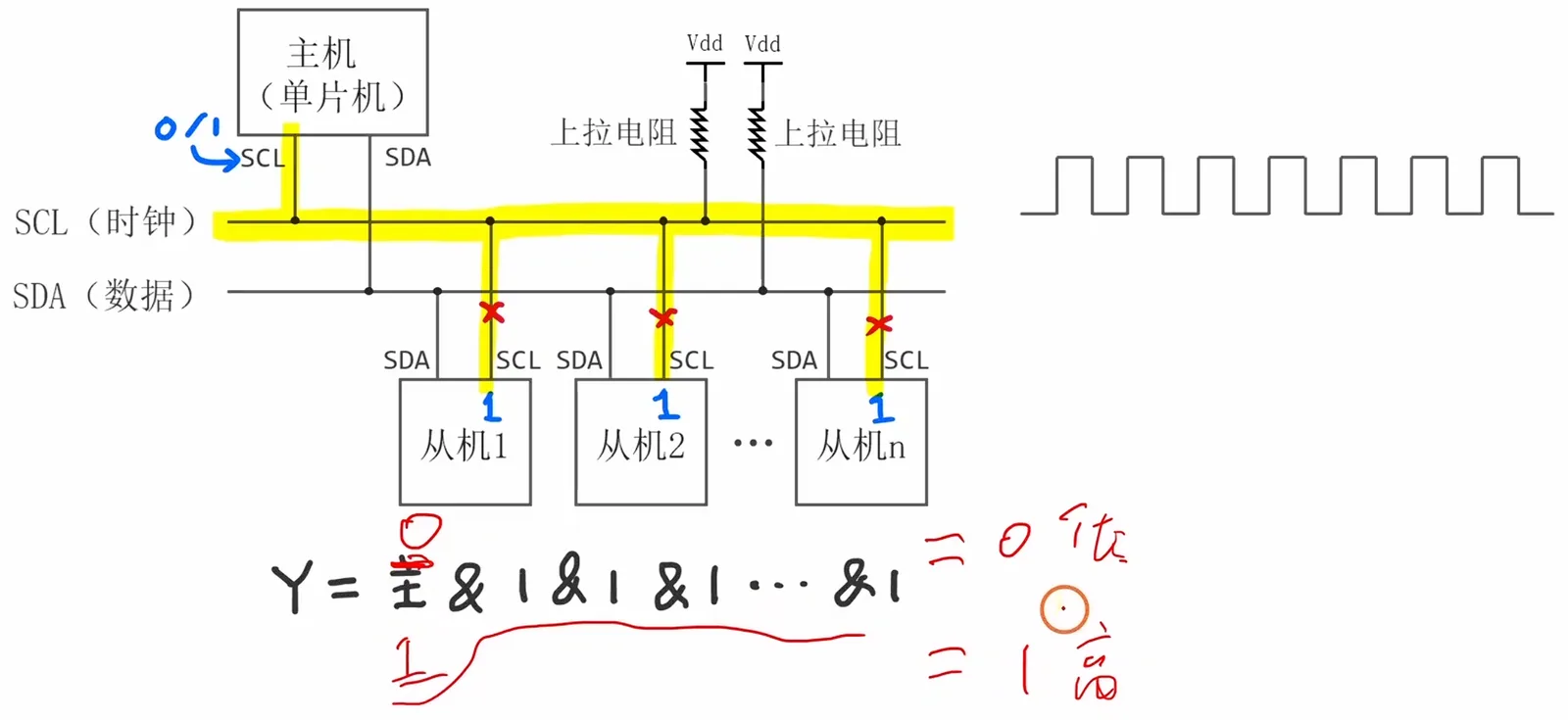
一、时钟信号(SCL - Serial Clock Line)
- 核心功能:由主机(如STM32单片机)产生并控制,为整个I2C通信提供同步时钟,所有数据传输都在SCL的时钟节拍下完成。
- 信号特性:
- 总线空闲时为高电平(由上拉电阻维持);
- 主机通过拉低/拉高SCL产生时钟脉冲,控制数据传输节奏;
- 从机仅能在特定场景下拉低SCL(如从机忙时的“时钟拉伸”),无法主动产生时钟。
- 关键规则:数据仅在SCL为高电平时稳定有效,SCL为低电平时SDA允许改变电平。
二、数据信号(SDA - Serial Data Line)
- 核心功能:用于主机与从机之间的双向数据传输(地址、命令、数据)。
- 信号特性:
- 总线空闲时为高电平(由上拉电阻维持);
- 开漏输出特性:所有设备的SDA引脚必须配置为开漏模式,通过上拉电阻实现电平上拉,避免总线冲突;
- 双向性:主机和被选中的从机均可驱动SDA传输数据(主机发地址/命令,从机回传数据)。
- 关键规则:
- SDA的电平变化必须在SCL为低电平时进行;
- SCL为高电平时,SDA电平不可改变,否则视为起始/停止信号。
总结
- SCL由主机控制,是通信的“同步节拍器”,数据有效性由SCL电平决定;
- SDA为双向数据线,需开漏输出+上拉电阻,电平仅能在SCL低电平时修改;
- 两条线空闲时均为高电平,是I2C通信的基础电气特性。
逻辑线与

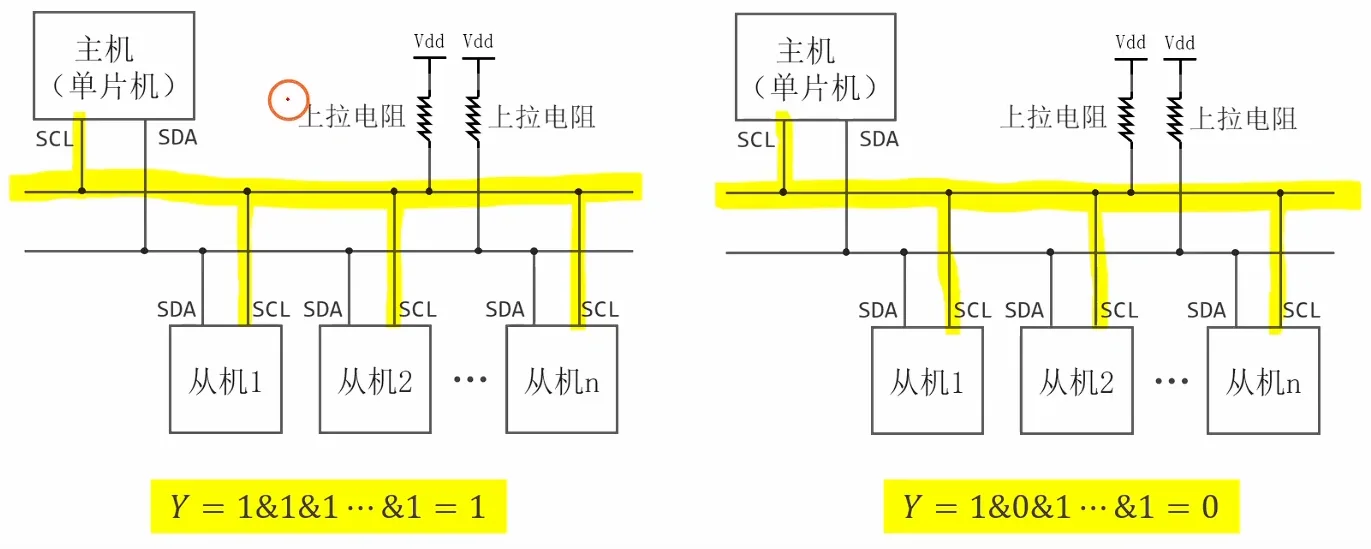
主机如何发送时钟信号
主机如何发送数据
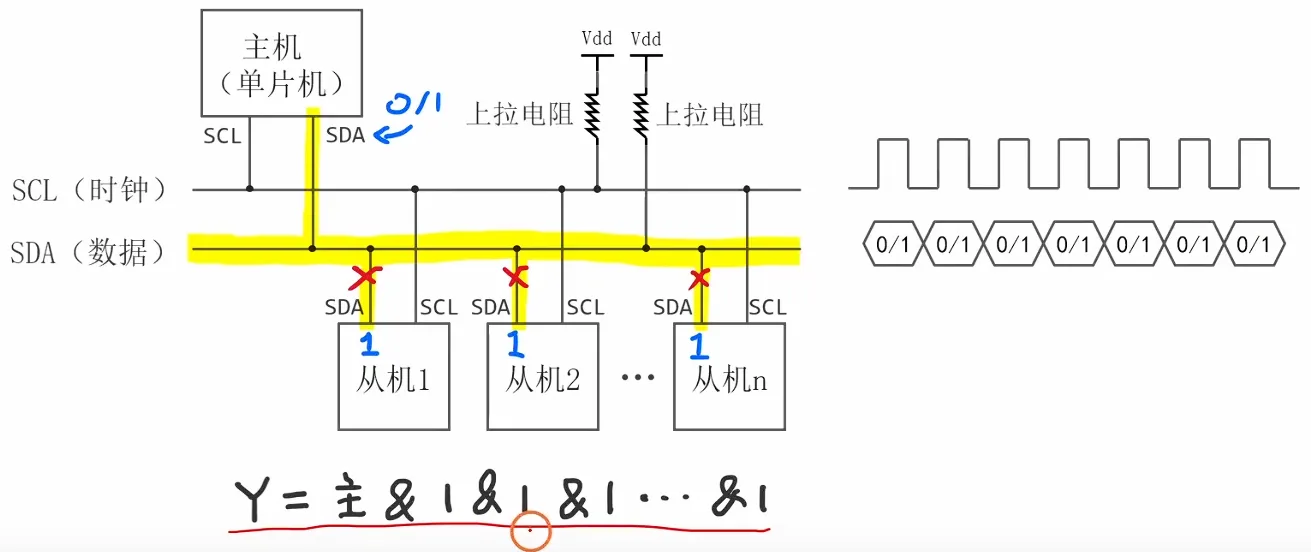
从机如何发送数据
4.2 [I2C]通信协议
I2C 通信的基本流程
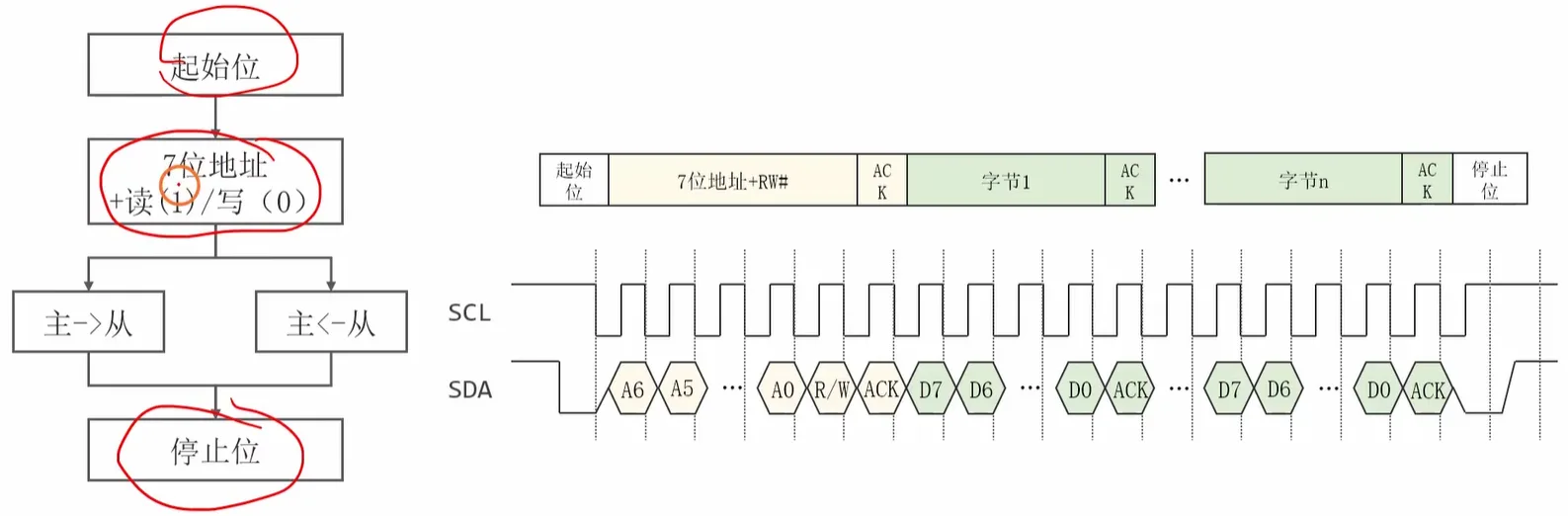
I2C 数据帧格式
起始位和停止位
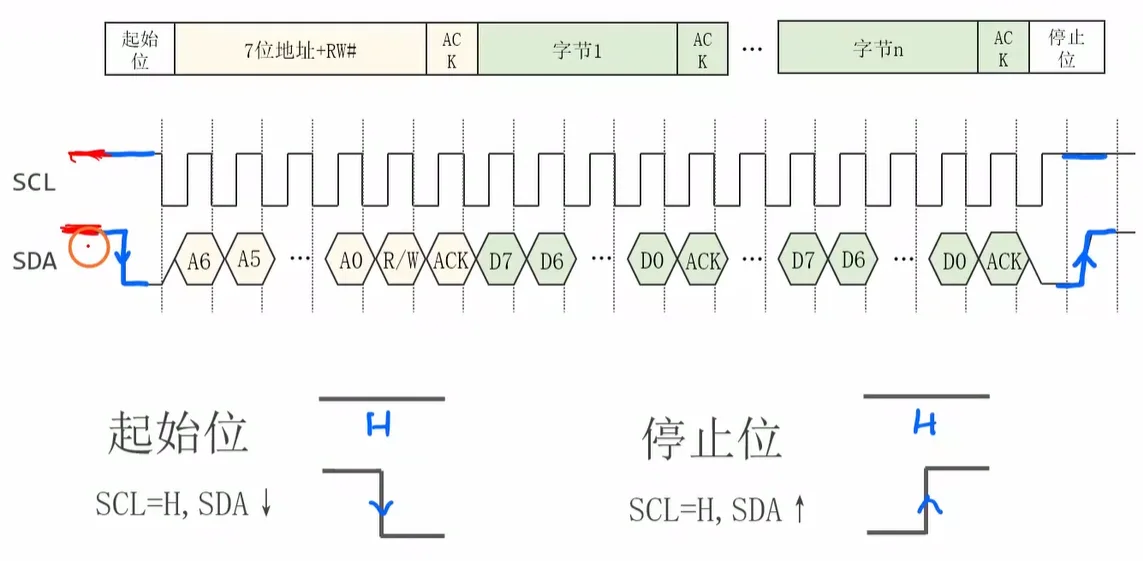
1. 起始位(Start)
- 条件:SCL 保持高电平(H)时,SDA 由高电平跳变为低电平(↓)。
- 作用:标志一次通信的开始。
2. 停止位(Stop)
- 条件:SCL 保持高电平(H)时,SDA 由低电平跳变为高电平(↑)。
- 作用:标志一次通信的结束。
3. 数据传输规则
- 每个数据字节为 8 位,传输顺序:从最高位(D7)到最低位(D0)。
- 每传输完 1 个字节,接收方必须返回一个 ACK 应答位(低电平表示应答,高电平表示非应答)。
- 数据位的变化必须在 SCL 为低电平时进行,SCL 为高电平时 SDA 必须保持稳定,以避免被误判为起始 / 停止位。
寻址
1. 通信帧结构
I2C 通信的基本帧格式如下:
起始位 → 7位从机地址 + R/W# → ACK → 数据字节1 → ACK → … → 数据字节n → ACK → 停止位- SCL:串行时钟,由主机产生,同步数据传输。
- SDA:串行数据,双向传输,承载地址和数据信息。
2. 寻址字节格式
寻址字节共 8 位,结构为:
[A6 A5 A4 A3 A2 A1 A0][R/W#]- A6~A0:7 位从机地址,用于指定通信目标。
- R/W#:读写控制位,
0表示主机向从机写数据,1表示主机从从机读数据。
3. 示例:寻址 0x78(读操作)
以从机地址 0x78 进行读操作为例:
- 7 位地址:
0x3C(二进制0111100),左移 1 位后得到0x78。 - 读操作:
R/W# = 1。 - 最终寻址字节:
01111001(十六进制0x79),对应各位为:
A6 A5 A4 A3 A2 A1 A0 R/W#
0  1  1  1  1  0  0  1
4. 应答(ACK)机制
- 定义:Acknowledge,用于确认数据或地址的成功接收。
- 时序:主机释放 SDA(拉高),从机将 SDA 拉低,表示应答成功。
- 必要性:每个字节(地址或数据)传输后,都必须跟随一个 ACK 位,确保通信可靠。
传输数据
- 地址与读写方向:先由主机发送 7 位从机地址 + R/W# 位,确定通信目标与数据方向。
- 数据传输:地址应答成功后,按方向传输多个数据字节,每个字节后跟随应答位。
- 结束:传输完成后由主机发送停止位,释放总线。
1. 主→从(写操作)传输
- 方向:主机向从机发送数据(R/W# = 0)。
- 步骤:
- 主机发送地址 + 写位。
- 从机应答(ACK):主机释放 SDA,从机将 SDA 拉低表示确认。
- 主机依次发送数据字节,每个字节后从机返回 ACK。
- 主机发送停止位,结束传输。
2. 主←从(读操作)传输
- 方向:主机从从机读取数据(R/W# = 1)。
- 步骤:
- 主机发送地址 + 读位。
- 从机应答(ACK)。
- 从机依次发送数据字节,每个字节后主机返回 ACK:从机释放 SDA,主机将 SDA 拉低表示确认。
- 主机可在最后一个字节后发送 NACK(不应答),再发送停止位结束传输。
3. 应答(ACK)机制细节
| 传输方向 | 应答方 | 时序行为 |
|---|---|---|
| 主→从(地址 / 数据) | 从机 | 主机释放 SDA,从机拉低 SDA |
| 主←从(数据) | 主机 | 从机释放 SDA,主机拉低 SDA |
- 应答是传输可靠性的关键,每个字节传输后都必须有对应的 ACK,否则视为传输失败。
- 读操作末尾的 NACK 用于告知从机 “无需再发送数据”,随后主机即可发起停止位。
示例
4.3 [I2C]I2C模块的使用方法
I2C模块
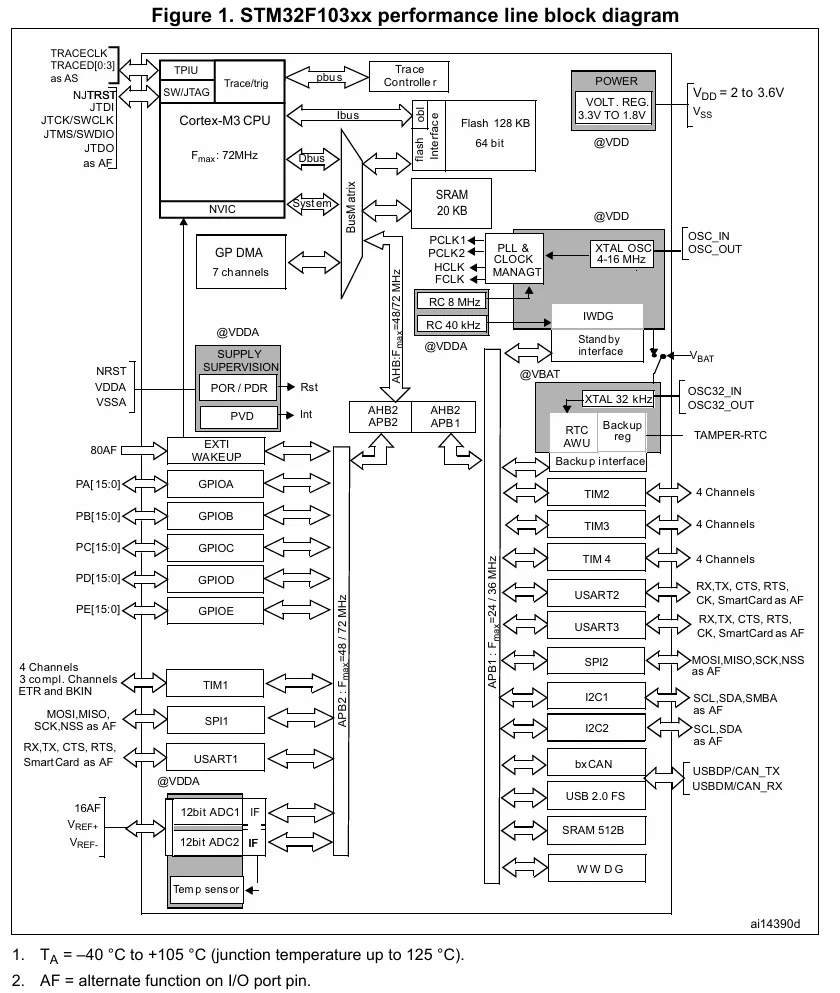
IO引脚初始化
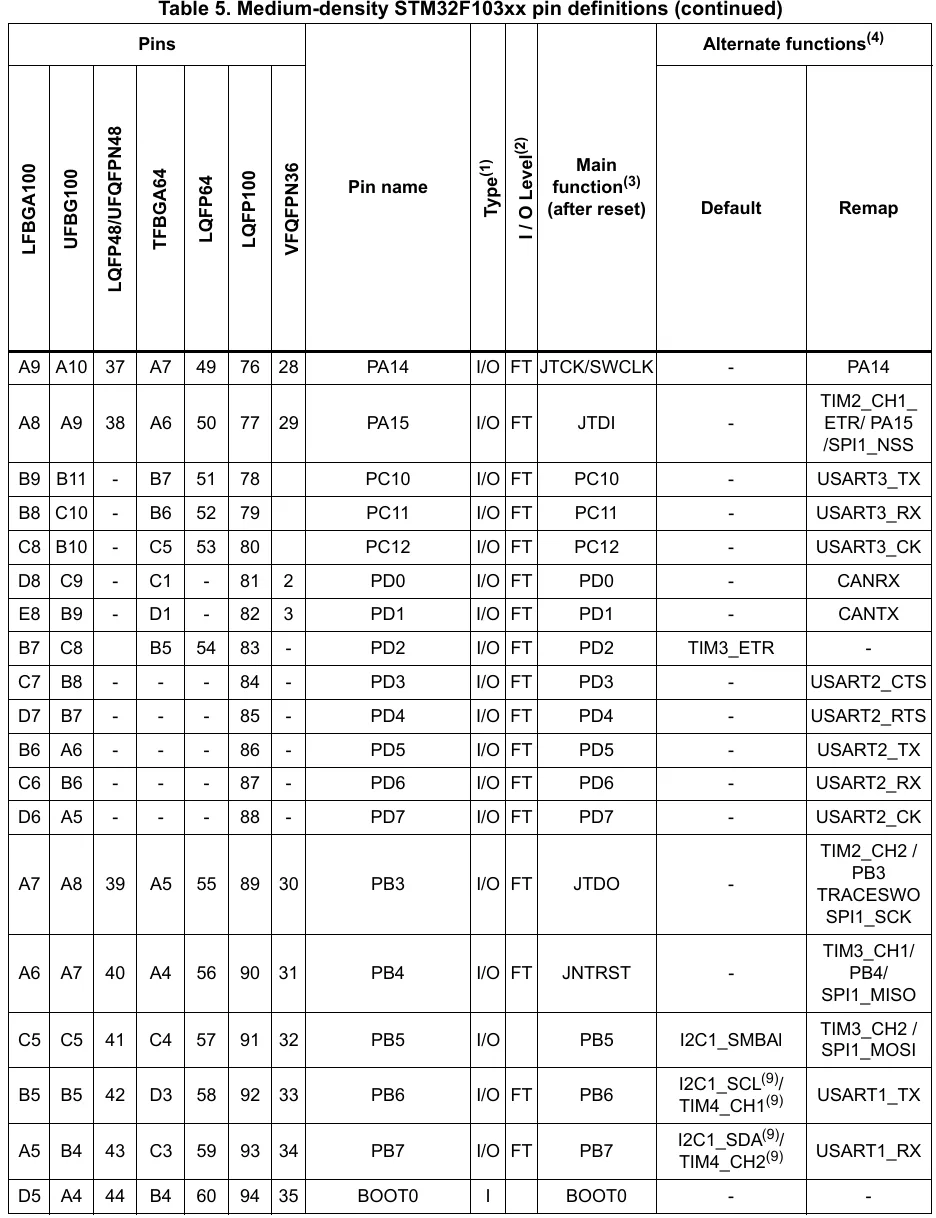
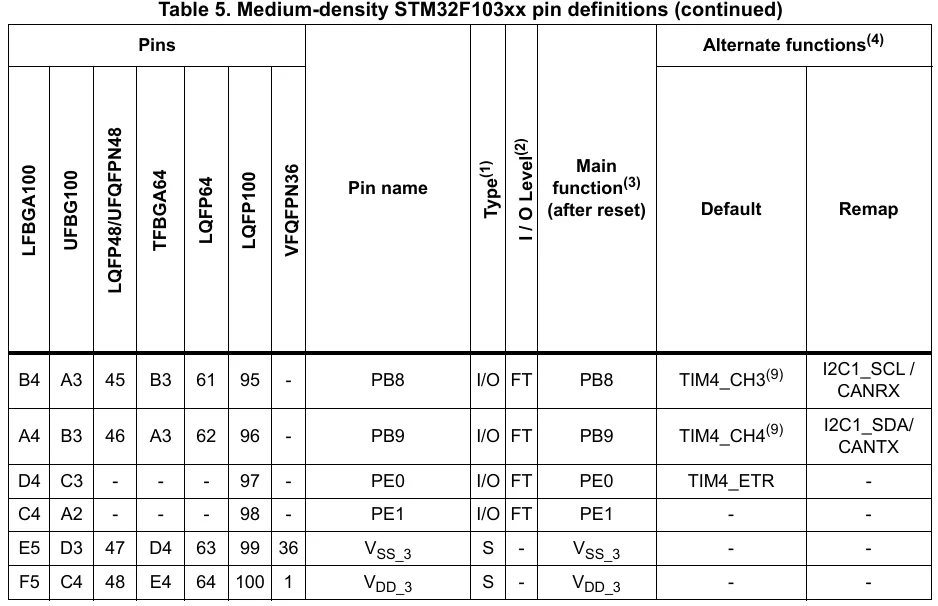
封装 I2C 初始化函数
void My_I2C_Init(void);

void My_I2C_Init(void)
{
    // 对IO引脚进行初始化
    // 对I2C1进行重映射AFIO
    RCC_APB2PeriphClockCmd(RCC_APB2Periph_AFIO | RCC_APB2Periph_GPIOB, ENABLE);

	GPIO_PinRemapConfig(GPIO_Remap_I2C1, ENABLE);
	GPIO_InitTypeDef GPIO_InitStruct;

	GPIO_InitStruct.GPIO_Pin = GPIO_Pin_8 | GPIO_Pin_9;
	GPIO_InitStruct.GPIO_Mode = GPIO_Mode_AF_OD;
	GPIO_InitStruct.GPIO_Speed = GPIO_Speed_2MHz;
	GPIO_Init(GPIOB, &GPIO_InitStruct);
}
连接电路
I2C速度模式
| 模式名称 | 缩写 | 英文名称 | 速率上限 |
|---|---|---|---|
| 标准模式 | Sm | Standard Mode | ≤100 kbps |
| 快速模式 | Fm | Fast Mode | ≤400 kbps |
| 快速增强模式 | Fm+ | Fast Mode Plus | ≤1 Mbps |
| 高速模式 | HSm | High Speed Mode | ≤3.4 Mbps |
| 超快模式 | UFm | Ultra Fast Mode | ≤5 Mbps |
补充要点
- 标准 / 快速模式:是最常用的基础模式,兼容性广泛,适合大多数外设通信。
- 快速增强 / 高速模式:通过优化总线驱动能力,实现更高带宽,适用于对数据传输速率有更高要求的场景。
- 超快模式:属于单向传输模式,不支持多主设备和应答机制,主要用于简化的高速数据广播场景。
时钟信号的占空比(快速模式)
1. 核心特性
- 适用范围:仅在 I2C **快速模式(Fm)**下支持设置时钟信号(SCL)的占空比,标准模式(Sm)无此配置选项。
- 占空比定义:以低电平时间 TLow 与高电平时间 THigh 的比值 TLow/THigh 来描述。
2. 典型占空比配置
| 配置示例 | TLow/THig****h | 波形对应时间 |
|---|---|---|
| 示例 1 | 2/1(一般情况) | 高电平 1 单位,低电平 2 单位 |
| 示例 2 | 16/9 | 高电平 9 单位,低电平 16 单位 |
3. 设计意义
通过调整占空比,可以优化总线在不同负载条件下的信号完整性,确保快速模式下的时序要求得到满足,提升传输稳定性。
I2C模块的初始化
1. 初始化函数
void I2C_Init(I2C_TypeDef *I2Cx, I2C_InitTypeDef *I2C_InitStruct);- 参数说明:
I2Cx:指定要初始化的 I2C 外设,如I2C1、I2C2。I2C_InitStruct:指向I2C_InitTypeDef结构体的指针,用于传递初始化参数。
- 作用:对指定的 I2C 外设进行初始化配置。
2. 初始化参数结构体 I2C_InitTypeDef
struct I2C_InitTypeDef {
    uint32_t I2C_ClockSpeed;    // 波特率设置
    uint16_t I2C_Mode;          // 工作模式选择
    uint16_t I2C_DutyCycle;     // 快速模式下的时钟占空比
    uint16_t I2C_Ack;           // 与从机模式相关的应答配置
    uint16_t I2C_OwnAddress1;   // 从机模式下的自身地址
    uint16_t I2C_AcknowledgedAddress; // 10位从机地址模式选择
};- 成员详解:
I2C_ClockSpeed:设置 I2C 总线波特率,标准模式(Sm)≤100 kbps,快速模式(Fm)≤400 kbps。I2C_Mode:选择工作模式,可选:I2C_Mode_I2C:标准 I2C 模式I2C_Mode_SMBusDevice:系统管理总线设备模式I2C_Mode_SMBusHost:系统管理总线主机模式
I2C_DutyCycle:快速模式下的时钟占空比,可选:I2C_DutyCycle_16_9:(T_{Low}/T_{High} = 16/9)I2C_DutyCycle_2:(T_{Low}/T_{High} = 2/1)
I2C_Ack:与从机模式相关,用于配置应答机制。I2C_OwnAddress1:从机模式下,设备自身的 I2C 地址。I2C_AcknowledgedAddress:用于选择 10 位从机地址模式。
初始化代码
// 开启I2C1的时钟,注意是APB1
RCC_APB1PeriphClockCmd(RCC_APB1Periph_I2C1, ENABLE);

// 复位(相当于重启)
// 施加复位信号
RCC_APB1PeriphResetCmd(RCC_APB1Periph_I2C1, ENABLE);
// 释放复位信号
RCC_APB1PeriphResetCmd(RCC_APB1Periph_I2C1, DISABLE);

// 定义初始化结构体
I2C_InitTypeDef I2C_InitStruct;

// 配置波特率为400kbps(快速模式)
I2C_InitStruct.I2C_ClockSpeed = 400000;
// 配置为标准I2C模式
I2C_InitStruct.I2C_Mode = I2C_Mode_I2C;
// 配置快速模式下的时钟占空比为2:1
I2C_InitStruct.I2C_DutyCycle = I2C_DutyCycle_2;

// 初始化I2C1外设
I2C_Init(I2C1, &I2C_InitStruct);

// 使能I2C1外设(闭合总开关)
I2C_Cmd(I2C1, ENABLE);
封装初始化函数
#include "stm32f10x.h"

void My_I2C_Init(void);

int main(void)
{
    My_I2C_Init();

    while(1)
    {
    }
}

void My_I2C_Init(void)
{
    // 对IO引脚进行初始化
    // 对I2C1进行重映射AFIO
    RCC_APB2PeriphClockCmd(RCC_APB2Periph_AFIO | RCC_APB2Periph_GPIOB, ENABLE);

	GPIO_PinRemapConfig(GPIO_Remap_I2C1, ENABLE);
	GPIO_InitTypeDef GPIO_InitStruct;

	GPIO_InitStruct.GPIO_Pin = GPIO_Pin_8 | GPIO_Pin_9;
	GPIO_InitStruct.GPIO_Mode = GPIO_Mode_AF_OD;
	GPIO_InitStruct.GPIO_Speed = GPIO_Speed_2MHz;
	GPIO_Init(GPIOB, &GPIO_InitStruct);

    // 开启I2C1的时钟,注意是APB1
    RCC_APB1PeriphClockCmd(RCC_APB1Periph_I2C1, ENABLE);

    // 复位(相当于重启)
    // 施加复位信号
    RCC_APB1PeriphResetCmd(RCC_APB1Periph_I2C1, ENABLE);
    // 释放复位信号
    RCC_APB1PeriphResetCmd(RCC_APB1Periph_I2C1, DISABLE);

    // 定义初始化结构体
    I2C_InitTypeDef I2C_InitStruct;

    // 配置波特率为400kbps(快速模式)
    I2C_InitStruct.I2C_ClockSpeed = 400000;
    // 配置为标准I2C模式
    I2C_InitStruct.I2C_Mode = I2C_Mode_I2C;
    // 配置快速模式下的时钟占空比为2:1
    I2C_InitStruct.I2C_DutyCycle = I2C_DutyCycle_2;

    // 初始化I2C1外设
    I2C_Init(I2C1, &I2C_InitStruct);

    // 使能I2C1外设(闭合总开关)
    I2C_Cmd(I2C1, ENABLE);
}
4.4 [I2C]写数据
I2C模块内部结构框图
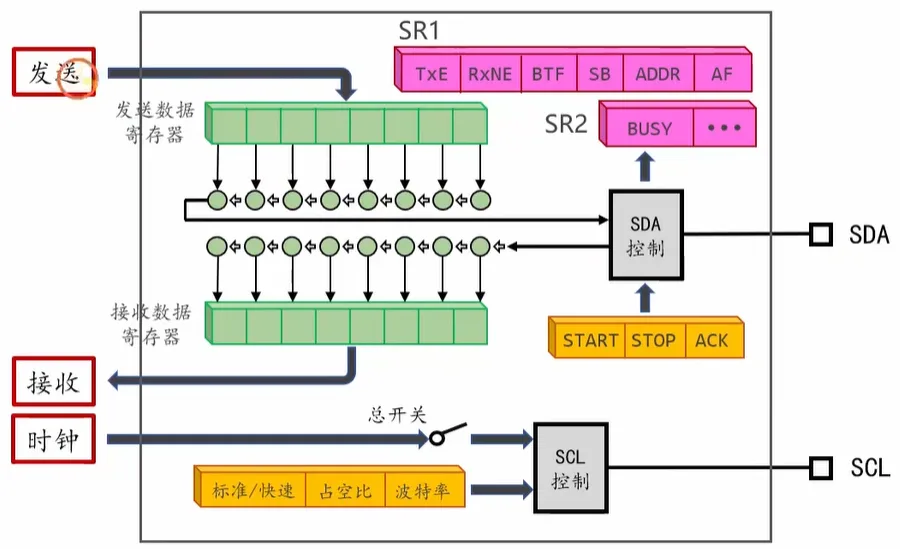
I2C 状态寄存器(SR1/SR2)
1. SR1(状态寄存器1)
SR1 用于反映 I2C 通信过程中的事件与传输状态,主要标志位如下:
| 标志位 | 全称 | 含义说明 |
|---|---|---|
TxE |
Transmit Data Register Empty | 发送数据寄存器为空,可向寄存器写入下一个待发送字节 |
RxNE |
Receive Data Register Not Empty | 接收数据寄存器非空,寄存器中已有可读取的新数据 |
BTF |
Byte Transfer Finished | 字节传输完成,当前字节已成功发送/接收,等待下一个字节或结束传输 |
SB |
Start Bit | 起始位已发送,主机已成功发起 I2C 起始条件 |
ADDR |
Address Sent/Matched | 地址阶段完成,从机地址已发送/匹配成功,进入数据传输阶段 |
AF |
Acknowledge Failure | 应答失败,传输后未收到对方应答信号,通常表示从机无响应或地址不匹配 |
2. SR2(状态寄存器2)
SR2 用于反映 I2C 总线及外设的整体工作状态,核心标志位:
| 标志位 | 全称 | 含义说明 |
|---|---|---|
BUSY |
Bus Busy | 总线忙状态,标识 I2C 总线正被占用(起始位已发送、停止位未发送的阶段) |
| … | 其他状态位 | 包含从机模式地址匹配、多主机竞争等额外状态信息(图中以“…”省略展示) |
3. 寄存器作用
- 时序控制:程序通过轮询/中断方式检查 SR1/SR2 标志位,判断通信进度(如起始位是否发送、地址是否应答、数据是否传输完成),是实现 I2C 读写时序的核心依据。
- 错误检测:通过
AF等标志位快速定位通信故障(如无应答、总线冲突),便于异常处理。
数据发送过程简介
I2C 数据发送过程(主机写模式)
- 起始与寻址阶段:
主机先发送 START 起始信号,接着送出 7 位从机地址 + 写控制位(R/W#=0),等待从机返回 ACK 应答,确认通信目标。 - 数据传输阶段:
- 主机将待发送字节写入发送数据寄存器,数据经内部移位寄存器逐位发送到 SDA 总线。
- 每发送完 1 字节,等待从机返回 ACK 应答;若应答成功,继续发送下一字节(重复“写寄存器→发送→等待ACK”流程)。
- 状态寄存器 SR1 会通过
TxE(发送寄存器空)、BTF(字节传输完成)等标志位,同步传输进度。
- 结束阶段:
所有数据发送完毕后,主机发送 STOP 停止信号,释放 I2C 总线,本次通信结束。
等待总线空闲
My_I2C_SendBytes
int My_I2C_SendBytes(I2C_TypeDef *I2Cx,  // I2C接口的名称(如I2C1、I2C2)
                     uint8_t Addr,       // 从机地址,靠左(7位地址左移1位,最低位为0表示写操作)
                     uint8_t *pData,     // 指向要发送数据的缓冲区指针
uint16_t Size); // 要发送的数据字节数量错误码对应:
0:全部数据发送完成且收到从机 ACK,流程正常结束。-1:起始条件或地址阶段未收到从机 ACK,属于寻址失败。-2:数据发送阶段未收到从机 ACK,属于数据被拒绝。
int My_I2C_SendBytes(I2C_TypeDef *I2Cx, uint8_t Addr, uint8_t *pData, uint16_t Size);

int My_I2C_SendBytes(I2C_TypeDef *I2Cx, uint8_t Addr, uint8_t *pData, uint16_t Size)
{
    // #1. 等待总线空闲
    while(I2C_GetFlagStatus(I2Cx, I2C_FLAG_BUSY) == SET);

    // #2. 发送起始位
    I2C_GenerateSTART(I2Cx, ENABLE);

    while(I2C_GetFlagStatus(I2Cx, I2C_FLAG_SB) == RESET);

    // #3. 寻址阶段
    I2C_ClearFlag(I2Cx, I2C_FLAG_AF);
    I2C_SendData(I2Cx, Addr & 0xfe);

    while(1)
    {
        if(I2C_GetFlagStatus(I2Cx, I2C_FLAG_ADDR) == SET)
        {
            break;
        }
        if(I2C_GetFlagStatus(I2Cx, I2C_FLAG_AF) == SET)
        {
            I2C_GenerateSTOP(I2Cx, ENABLE);
            return -1; // 寻址失败
        }
    }

    // 清除ADDR
    I2C_ReadRegister(I2Cx, I2C_Register_SR1);
    I2C_ReadRegister(I2Cx, I2C_Register_SR2);

    // #4. 发送数据
    for(uint16_t i=0; i<Size; i++)
    {
        while(1)
        {
            if(I2C_GetFlagStatus(I2Cx, I2C_FLAG_AF) == SET)
            {
                I2C_GenerateSTOP(I2Cx, ENABLE);
                return -2;	// 数据拒收
            }
            if(I2C_GetFlagStatus(I2Cx, I2C_FLAG_TXE) == SET)
            {
                break;
            }
        }

        I2C_SendData(I2Cx, pData[i]);
    }

    while(1)
    {
        if(I2C_GetFlagStatus(I2Cx, I2C_FLAG_AF) == SET)
        {
            I2C_GenerateSTOP(I2Cx, ENABLE);
            return -2; // 数据被拒收
        }

        if(I2C_GetFlagStatus(I2Cx, I2C_FLAG_BTF) == SET)
        {
            break;
        }
    }

    // #5. 发送停止位
    I2C_GenerateSTOP(I2Cx, ENABLE);
    return 0; // 成功
}
发送起始位
发送地址
发送数据
发送停止位
完整实验代码
#include "stm32f10x.h"

void My_I2C_Init(void);
int My_I2C_SendBytes(I2C_TypeDef *I2Cx, uint8_t Addr, uint8_t *pData, uint16_t Size);

int main(void)
{
    My_I2C_Init();

    uint8_t commands[] = {
    0x00,  // 命令流
    0x8d, 0x14,  // 使能电荷泵
    0xaf,  // 打开屏幕开关
    0xa5   // 让屏幕全亮
    };

    My_I2C_SendBytes(I2C1, 0x78, commands, 5);

    while(1)
    {
    }
}

void My_I2C_Init(void)
{
    // 对IO引脚进行初始化
    // 对I2C1进行重映射AFIO
    RCC_APB2PeriphClockCmd(RCC_APB2Periph_AFIO | RCC_APB2Periph_GPIOB, ENABLE);

	GPIO_PinRemapConfig(GPIO_Remap_I2C1, ENABLE);
	GPIO_InitTypeDef GPIO_InitStruct;

	GPIO_InitStruct.GPIO_Pin = GPIO_Pin_8 | GPIO_Pin_9;
	GPIO_InitStruct.GPIO_Mode = GPIO_Mode_AF_OD;
	GPIO_InitStruct.GPIO_Speed = GPIO_Speed_2MHz;
	GPIO_Init(GPIOB, &GPIO_InitStruct);

    // 开启I2C1的时钟,注意是APB1
    RCC_APB1PeriphClockCmd(RCC_APB1Periph_I2C1, ENABLE);

    // 复位(相当于重启)
    // 施加复位信号
    RCC_APB1PeriphResetCmd(RCC_APB1Periph_I2C1, ENABLE);
    // 释放复位信号
    RCC_APB1PeriphResetCmd(RCC_APB1Periph_I2C1, DISABLE);

    // 定义初始化结构体
    I2C_InitTypeDef I2C_InitStruct;

    // 配置波特率为400kbps(快速模式)
    I2C_InitStruct.I2C_ClockSpeed = 400000;
    // 配置为标准I2C模式
    I2C_InitStruct.I2C_Mode = I2C_Mode_I2C;
    // 配置快速模式下的时钟占空比为2:1
    I2C_InitStruct.I2C_DutyCycle = I2C_DutyCycle_2;

    // 初始化I2C1外设
    I2C_Init(I2C1, &I2C_InitStruct);

    // 使能I2C1外设(闭合总开关)
    I2C_Cmd(I2C1, ENABLE);
}

int My_I2C_SendBytes(I2C_TypeDef *I2Cx, uint8_t Addr, uint8_t *pData, uint16_t Size)
{
    // #1. 等待总线空闲
    while(I2C_GetFlagStatus(I2Cx, I2C_FLAG_BUSY) == SET);

    // #2. 发送起始位
    I2C_GenerateSTART(I2Cx, ENABLE);

    while(I2C_GetFlagStatus(I2Cx, I2C_FLAG_SB) == RESET);

    // #3. 寻址阶段
    I2C_ClearFlag(I2Cx, I2C_FLAG_AF);
    I2C_SendData(I2Cx, Addr & 0xfe);

    while(1)
    {
        if(I2C_GetFlagStatus(I2Cx, I2C_FLAG_ADDR) == SET)
        {
            break;
        }
        if(I2C_GetFlagStatus(I2Cx, I2C_FLAG_AF) == SET)
        {
            I2C_GenerateSTOP(I2Cx, ENABLE);
            return -1; // 寻址失败
        }
    }

    // 清除ADDR
    I2C_ReadRegister(I2Cx, I2C_Register_SR1);
    I2C_ReadRegister(I2Cx, I2C_Register_SR2);

    // #4. 发送数据
    for(uint16_t i=0; i<Size; i++)
    {
        while(1)
        {
            if(I2C_GetFlagStatus(I2Cx, I2C_FLAG_AF) == SET)
            {
                I2C_GenerateSTOP(I2Cx, ENABLE);
                return -2;	// 数据拒收
            }
            if(I2C_GetFlagStatus(I2Cx, I2C_FLAG_TXE) == SET)
            {
                break;
            }
        }

        I2C_SendData(I2Cx, pData[i]);
    }

    while(1)
    {
        if(I2C_GetFlagStatus(I2Cx, I2C_FLAG_AF) == SET)
        {
            I2C_GenerateSTOP(I2Cx, ENABLE);
            return -2; // 数据被拒收
        }

        if(I2C_GetFlagStatus(I2Cx, I2C_FLAG_BTF) == SET)
        {
            break;
        }
    }

    // #5. 发送停止位
    I2C_GenerateSTOP(I2Cx, ENABLE);
    return 0; // 成功
}
4.5 [I2C]读数据
My_I2C_ReceiveBytes
int My_I2C_ReceiveBytes(I2C_TypeDef *I2Cx,  // I2C接口的名称
                        uint8_t  Addr,       // 从机地址,靠左
                        uint8_t  *pBuffer,  // 接收缓冲区
                        uint16_t  Size);     // 要接收的数据的数量(字节)
说明:
- 视频里注释写的是 “要发送的数据的数量”,结合函数作用 “从从机读取若干个字节”,这里应该是笔误,实际是要接收的数据字节数。
- 函数返回值定义:
0表示读取成功,-1表示寻址失败。
int My_I2C_ReceiveBytes(I2C_TypeDef *I2Cx, uint8_t Addr, uint8_t *pBuffer, uint16_t Size);

int My_I2C_ReceiveBytes(I2C_TypeDef *I2Cx, uint8_t Addr, uint8_t *pBuffer, uint16_t Size)
{
    // #1. 发送起始位
    I2C_GenerateSTART(I2Cx, ENABLE);

    while(I2C_GetFlagStatus(I2Cx, I2C_FLAG_SB) == RESET);

    // #2. 寻址阶段
    I2C_ClearFlag(I2Cx, I2C_FLAG_AF);
    I2C_SendData(I2Cx, Addr | 0x01);

    while(1)
    {
        if(I2C_GetFlagStatus(I2Cx, I2C_FLAG_AF) == SET)
        {
            I2C_GenerateSTOP(I2Cx, ENABLE);
            return -1; // 寻址失败
        }

        if(I2C_GetFlagStatus(I2Cx, I2C_FLAG_ADDR) == SET)
        {
            break;
        }
    }

    // #3. 接收数据
    if(Size == 1){
    // 清除ADDR
    I2C_ReadRegister(I2Cx, I2C_Register_SR1);
    I2C_ReadRegister(I2Cx, I2C_Register_SR2);

    // 向ACK写0
    I2C_AcknowledgeConfig(I2Cx, DISABLE);

    // 发送停止位
    I2C_GenerateSTOP(I2Cx, ENABLE);

    // 等待RxNE置位
    while(I2C_GetFlagStatus(I2Cx, I2C_FLAG_RXNE) == RESET);

    // 读取数据
    pBuffer[0] = I2C_ReceiveData(I2Cx);
    }
    else if(Size == 2){
    // 清除ADDR标志位
    I2C_ReadRegister(I2Cx, I2C_Register_SR1);
    I2C_ReadRegister(I2Cx, I2C_Register_SR2);

    // ACK=1
    I2C_AcknowledgeConfig(I2Cx, ENABLE);

    // 等待接收完成
    while(I2C_GetFlagStatus(I2Cx, I2C_FLAG_RXNE) == RESET);

    // 读取第一个字节
    pBuffer[0] = I2C_ReceiveData(I2Cx);

    // ACK=0  STOP=1
    I2C_AcknowledgeConfig(I2Cx, DISABLE);
    I2C_GenerateSTOP(I2Cx, ENABLE);

    // 等待接收完成
    while(I2C_GetFlagStatus(I2Cx, I2C_FLAG_RXNE) == RESET);

    pBuffer[1] = I2C_ReceiveData(I2Cx);
    }
    else{
    // 清除ADDR标志位
    I2C_ReadRegister(I2Cx, I2C_Register_SR1);
    I2C_ReadRegister(I2Cx, I2C_Register_SR2);

    // ACK=1
    I2C_AcknowledgeConfig(I2Cx, ENABLE);

    for(uint16_t i=0; i<Size-1; i++)
    {
        // 等待接收完成
        while(I2C_GetFlagStatus(I2Cx, I2C_FLAG_RXNE) == RESET);
        // 读取数据
        pBuffer[i] = I2C_ReceiveData(I2Cx);
    }

    // ACK=0
    I2C_AcknowledgeConfig(I2Cx, DISABLE);
    I2C_GenerateSTOP(I2Cx, ENABLE);

    // 等待接收完成
    while(I2C_GetFlagStatus(I2Cx, I2C_FLAG_RXNE) == RESET);

    pBuffer[Size-1] = I2C_ReceiveData(I2Cx);
    }

    return 0;
}
数据读取的流程

时序概览
起始位 → 7位地址+RW#(读) → ACK → 接收第1字节→ACK → ... → 接收第n字节→NACK → 停止位- RW#:读操作时地址最低位必须为
1(即Addr | 0x01) - ACK:主机接收每字节后,需回复应答(除最后一字节外)
- NACK:接收最后一字节后,主机必须回复非应答,触发从机结束发送
发送起始位和地址
总线空闲检测 + 发送起始位
| 操作 | 关键函数/标志位 | 说明 |
|---|---|---|
| 等待总线空闲 | while(I2C_GetFlagStatus(I2Cx, I2C_FLAG_BUSY) == SET) |
避免总线忙时通信冲突 |
| 生成起始位 | I2C_GenerateSTART(I2Cx, ENABLE) |
发起I2C通信起始信号 |
| 等待起始位完成 | while(I2C_GetFlagStatus(I2Cx, I2C_FLAG_SB) == RESET) |
等待EV5事件(起始位发送完成) |
寻址阶段(读模式)
| 操作 | 关键代码/标志位 | 说明 |
|---|---|---|
| 清除旧错误标志 | I2C_ClearFlag(I2Cx, I2C_FLAG_AF) |
清零应答失败标志,防止误判 |
| 发送地址+读位 | I2C_SendData(I2Cx, Addr |
0x01) |
| 轮询寻址结果 | 死循环检测 I2C_FLAG_ADDR/I2C_FLAG_AF |
超时保护+错误处理: ADDR=SET:寻址成功,跳出循环 AF=SET:寻址失败,发停止位返回-1 |
| 清除ADDR标志 | (void)I2C_ReadRegister(I2Cx, I2C_Register_SR1); (void)I2C_ReadRegister(I2Cx, I2C_Register_SR2); |
必须读SR1+SR2清除ADDR标志,否则状态机卡死 |
如何发送ACK和NAK
通用规则
- 前
n-1字节:接收后回复ACK,通知从机继续发送下一字节 - 第
n字节:接收后回复NACK,通知从机停止发送(触发停止位)
接收前 n-1 字节(带ACK)
// 示例:接收单字节(前n-1字节逻辑)
while(1)
{
    // 超时保护
    if(--timeout == 0) { I2C_GenerateSTOP(I2Cx, ENABLE); return -2; }
    // 等待接收数据寄存器非空(RXNE=SET)
    if(I2C_GetFlagStatus(I2Cx, I2C_FLAG_RXNE) == SET)
    {
        *pBuffer++ = I2C_ReceiveData(I2Cx); // 读取数据
        I2C_AcknowledgeConfig(I2Cx, ENABLE); // 开启ACK,准备接收下一字节
        break;
    }
    // 应答失败检测
    if(I2C_GetFlagStatus(I2Cx, I2C_FLAG_AF) == SET)
    {
        I2C_ClearFlag(I2Cx, I2C_FLAG_AF);
        I2C_GenerateSTOP(I2Cx, ENABLE);
        return -2;
    }
}
接收最后 1 字节(带NACK)
// 示例:接收最后一字节
while(1)
{
    if(--timeout == 0) { I2C_GenerateSTOP(I2Cx, ENABLE); return -2; }
    if(I2C_GetFlagStatus(I2Cx, I2C_FLAG_RXNE) == SET)
    {
        *pBuffer++ = I2C_ReceiveData(I2Cx); // 读取最后一字节
        I2C_AcknowledgeConfig(I2Cx, DISABLE); // 关闭ACK,准备发NACK
        break;
    }
    if(I2C_GetFlagStatus(I2Cx, I2C_FLAG_AF) == SET)
    {
        I2C_ClearFlag(I2Cx, I2C_FLAG_AF);
        I2C_GenerateSTOP(I2Cx, ENABLE);
        return -2;
    }
}
如何发送停止位
发送停止位
I2C_GenerateSTOP(I2Cx, ENABLE); // 触发I2C停止位,结束通信
return 0; // 读取成功
注意事项
- 地址位必须正确:读操作时地址最低位一定是
1(Addr | 0x01),写操作是0(Addr & 0xFE),两者不能混淆。 - ADDR标志必清除:仅读SR1+SR2无法清除,必须连续读取两个寄存器(SR1+SR2),否则下一次I2C操作会卡死。
- NACK是最后一步:接收最后一字节后必须先关ACK,再发停止位,否则从机会持续等待应答,导致通信异常。
- 超时保护不可少:所有死循环必须加
timeout计数,避免从机无响应时程序永久卡死。 - AF标志必清除:检测到
AF(应答失败)后,必须用I2C_ClearFlag清除,否则后续通信会被错误标志干扰。
错误码规范
| 返回值 | 含义 | 场景 |
|---|---|---|
0 |
读取成功 | 所有字节正常接收完成 |
-1 |
寻址失败 | 起始位/地址阶段未收到从机ACK |
-2 |
数据接收失败 | 接收过程中应答失败/超时 |
-3 |
参数非法 | 空指针/空缓冲区/无效外设 |
Size = 1
if(Size == 1){
    // 清除ADDR
    I2C_ReadRegister(I2Cx, I2C_Register_SR1);
    I2C_ReadRegister(I2Cx, I2C_Register_SR2);

    // 向ACK写0
    I2C_AcknowledgeConfig(I2Cx, DISABLE);

    // 发送停止位
    I2C_GenerateSTOP(I2Cx, ENABLE);

    // 等待RxNE置位
    while(I2C_GetFlagStatus(I2Cx, I2C_FLAG_RXNE) == RESET);

    // 读取数据
    pBuffer[0] = I2C_ReceiveData(I2Cx);
}
Size = 2
if(Size == 2){
    // 清除ADDR标志位
    I2C_ReadRegister(I2Cx, I2C_Register_SR1);
    I2C_ReadRegister(I2Cx, I2C_Register_SR2);

    // ACK=1
    I2C_AcknowledgeConfig(I2Cx, ENABLE);

    // 等待接收完成
    while(I2C_GetFlagStatus(I2Cx, I2C_FLAG_RXNE) == RESET);

    // 读取第一个字节
    pBuffer[0] = I2C_ReceiveData(I2Cx);

    // ACK=0  STOP=1
    I2C_AcknowledgeConfig(I2Cx, DISABLE);
    I2C_GenerateSTOP(I2Cx, ENABLE);

    // 等待接收完成
    while(I2C_GetFlagStatus(I2Cx, I2C_FLAG_RXNE) == RESET);

    pBuffer[1] = I2C_ReceiveData(I2Cx);
}
Size > 2
if(Size >= 2){
    // 清除ADDR标志位
    I2C_ReadRegister(I2Cx, I2C_Register_SR1);
    I2C_ReadRegister(I2Cx, I2C_Register_SR2);

    // ACK=1
    I2C_AcknowledgeConfig(I2Cx, ENABLE);

    for(uint16_t i=0; i<Size-1; i++)
    {
        // 等待接收完成
        while(I2C_GetFlagStatus(I2Cx, I2C_FLAG_RXNE) == RESET);
        // 读取数据
        pBuffer[i] = I2C_ReceiveData(I2Cx);
    }

    // ACK=0
    I2C_AcknowledgeConfig(I2Cx, DISABLE);
    I2C_GenerateSTOP(I2Cx, ENABLE);

    // 等待接收完成
    while(I2C_GetFlagStatus(I2Cx, I2C_FLAG_RXNE) == RESET);

    pBuffer[Size-1] = I2C_ReceiveData(I2Cx);
}
完整实验代码
#include "stm32f10x.h"

void My_I2C_Init(void);
// 初始化板载LED
void My_OnBoardLED_Init(void);
int My_I2C_SendBytes(I2C_TypeDef *I2Cx, uint8_t Addr, uint8_t *pData, uint16_t Size);
int My_I2C_ReceiveBytes(I2C_TypeDef *I2Cx, uint8_t Addr, uint8_t *pBuffer, uint16_t Size);

int main(void)
{
    My_I2C_Init();
    My_OnBoardLED_Init();

    uint8_t commands[] = {
    0x00,  // 命令流
    0x8d, 0x14,  // 使能电荷泵
    0xaf,  // 打开屏幕开关
    0xa5   // 让屏幕全亮
    };

    My_I2C_SendBytes(I2C1, 0x78, commands, 5);

    uint8_t rcvd;

    My_I2C_ReceiveBytes(I2C1, 0x78, &rcvd, 1);

    if((rcvd & (0x01 << 6)) == 0)
    {
        GPIO_WriteBit(GPIOC, GPIO_Pin_13, Bit_RESET);
    }
    else
    {
        GPIO_WriteBit(GPIOC, GPIO_Pin_13, Bit_SET);
    }

    while(1)
    {
    }
}

void My_I2C_Init(void)
{
    // 对IO引脚进行初始化
    // 对I2C1进行重映射AFIO
    RCC_APB2PeriphClockCmd(RCC_APB2Periph_AFIO | RCC_APB2Periph_GPIOB, ENABLE);

	GPIO_PinRemapConfig(GPIO_Remap_I2C1, ENABLE);
	GPIO_InitTypeDef GPIO_InitStruct;

	GPIO_InitStruct.GPIO_Pin = GPIO_Pin_8 | GPIO_Pin_9;
	GPIO_InitStruct.GPIO_Mode = GPIO_Mode_AF_OD;
	GPIO_InitStruct.GPIO_Speed = GPIO_Speed_2MHz;
	GPIO_Init(GPIOB, &GPIO_InitStruct);

    // 开启I2C1的时钟,注意是APB1
    RCC_APB1PeriphClockCmd(RCC_APB1Periph_I2C1, ENABLE);

    // 复位(相当于重启)
    // 施加复位信号
    RCC_APB1PeriphResetCmd(RCC_APB1Periph_I2C1, ENABLE);
    // 释放复位信号
    RCC_APB1PeriphResetCmd(RCC_APB1Periph_I2C1, DISABLE);

    // 定义初始化结构体
    I2C_InitTypeDef I2C_InitStruct;

    // 配置波特率为400kbps(快速模式)
    I2C_InitStruct.I2C_ClockSpeed = 400000;
    // 配置为标准I2C模式
    I2C_InitStruct.I2C_Mode = I2C_Mode_I2C;
    // 配置快速模式下的时钟占空比为2:1
    I2C_InitStruct.I2C_DutyCycle = I2C_DutyCycle_2;

    // 初始化I2C1外设
    I2C_Init(I2C1, &I2C_InitStruct);

    // 使能I2C1外设(闭合总开关)
    I2C_Cmd(I2C1, ENABLE);
}

int My_I2C_SendBytes(I2C_TypeDef *I2Cx, uint8_t Addr, uint8_t *pData, uint16_t Size)
{
    // #1. 等待总线空闲
    while(I2C_GetFlagStatus(I2Cx, I2C_FLAG_BUSY) == SET);

    // #2. 发送起始位
    I2C_GenerateSTART(I2Cx, ENABLE);

    while(I2C_GetFlagStatus(I2Cx, I2C_FLAG_SB) == RESET);

    // #3. 寻址阶段
    I2C_ClearFlag(I2Cx, I2C_FLAG_AF);
    I2C_SendData(I2Cx, Addr & 0xfe);

    while(1)
    {
        if(I2C_GetFlagStatus(I2Cx, I2C_FLAG_ADDR) == SET)
        {
            break;
        }
        if(I2C_GetFlagStatus(I2Cx, I2C_FLAG_AF) == SET)
        {
            I2C_GenerateSTOP(I2Cx, ENABLE);
            return -1; // 寻址失败
        }
    }

    // 清除ADDR
    I2C_ReadRegister(I2Cx, I2C_Register_SR1);
    I2C_ReadRegister(I2Cx, I2C_Register_SR2);

    // #4. 发送数据
    for(uint16_t i=0; i<Size; i++)
    {
        while(1)
        {
            if(I2C_GetFlagStatus(I2Cx, I2C_FLAG_AF) == SET)
            {
                I2C_GenerateSTOP(I2Cx, ENABLE);
                return -2;	// 数据拒收
            }
            if(I2C_GetFlagStatus(I2Cx, I2C_FLAG_TXE) == SET)
            {
                break;
            }
        }

        I2C_SendData(I2Cx, pData[i]);
    }

    while(1)
    {
        if(I2C_GetFlagStatus(I2Cx, I2C_FLAG_AF) == SET)
        {
            I2C_GenerateSTOP(I2Cx, ENABLE);
            return -2; // 数据被拒收
        }

        if(I2C_GetFlagStatus(I2Cx, I2C_FLAG_BTF) == SET)
        {
            break;
        }
    }

    // #5. 发送停止位
    I2C_GenerateSTOP(I2Cx, ENABLE);
    return 0; // 成功
}

int My_I2C_ReceiveBytes(I2C_TypeDef *I2Cx, uint8_t Addr, uint8_t *pBuffer, uint16_t Size)
{
    // #1. 发送起始位
    I2C_GenerateSTART(I2Cx, ENABLE);

    while(I2C_GetFlagStatus(I2Cx, I2C_FLAG_SB) == RESET);

    // #2. 寻址阶段
    I2C_ClearFlag(I2Cx, I2C_FLAG_AF);
    I2C_SendData(I2Cx, Addr | 0x01);

    while(1)
    {
        if(I2C_GetFlagStatus(I2Cx, I2C_FLAG_AF) == SET)
        {
            I2C_GenerateSTOP(I2Cx, ENABLE);
            return -1; // 寻址失败
        }

        if(I2C_GetFlagStatus(I2Cx, I2C_FLAG_ADDR) == SET)
        {
            break;
        }
    }

    // #3. 接收数据
    if(Size == 1){
    // 清除ADDR
    I2C_ReadRegister(I2Cx, I2C_Register_SR1);
    I2C_ReadRegister(I2Cx, I2C_Register_SR2);

    // 向ACK写0
    I2C_AcknowledgeConfig(I2Cx, DISABLE);

    // 发送停止位
    I2C_GenerateSTOP(I2Cx, ENABLE);

    // 等待RxNE置位
    while(I2C_GetFlagStatus(I2Cx, I2C_FLAG_RXNE) == RESET);

    // 读取数据
    pBuffer[0] = I2C_ReceiveData(I2Cx);
    }
    else if(Size == 2){
    // 清除ADDR标志位
    I2C_ReadRegister(I2Cx, I2C_Register_SR1);
    I2C_ReadRegister(I2Cx, I2C_Register_SR2);

    // ACK=1
    I2C_AcknowledgeConfig(I2Cx, ENABLE);

    // 等待接收完成
    while(I2C_GetFlagStatus(I2Cx, I2C_FLAG_RXNE) == RESET);

    // 读取第一个字节
    pBuffer[0] = I2C_ReceiveData(I2Cx);

    // ACK=0  STOP=1
    I2C_AcknowledgeConfig(I2Cx, DISABLE);
    I2C_GenerateSTOP(I2Cx, ENABLE);

    // 等待接收完成
    while(I2C_GetFlagStatus(I2Cx, I2C_FLAG_RXNE) == RESET);

    pBuffer[1] = I2C_ReceiveData(I2Cx);
    }
    else{
    // 清除ADDR标志位
    I2C_ReadRegister(I2Cx, I2C_Register_SR1);
    I2C_ReadRegister(I2Cx, I2C_Register_SR2);

    // ACK=1
    I2C_AcknowledgeConfig(I2Cx, ENABLE);

    for(uint16_t i=0; i<Size-1; i++)
    {
        // 等待接收完成
        while(I2C_GetFlagStatus(I2Cx, I2C_FLAG_RXNE) == RESET);
        // 读取数据
        pBuffer[i] = I2C_ReceiveData(I2Cx);
    }

    // ACK=0
    I2C_AcknowledgeConfig(I2Cx, DISABLE);
    I2C_GenerateSTOP(I2Cx, ENABLE);

    // 等待接收完成
    while(I2C_GetFlagStatus(I2Cx, I2C_FLAG_RXNE) == RESET);

    pBuffer[Size-1] = I2C_ReceiveData(I2Cx);
    }

    return 0;
}

void My_OnBoardLED_Init(void)
{
    RCC_APB2PeriphClockCmd(RCC_APB2Periph_GPIOC, ENABLE);

    GPIO_InitTypeDef GPIO_InitStruct;

    GPIO_InitStruct.GPIO_Pin = GPIO_Pin_13;
    GPIO_InitStruct.GPIO_Mode = GPIO_Mode_Out_OD;
    GPIO_InitStruct.GPIO_Speed = GPIO_Speed_2MHz;

    GPIO_Init(GPIOC, &GPIO_InitStruct);
}
4.6 [I2C]软I2C
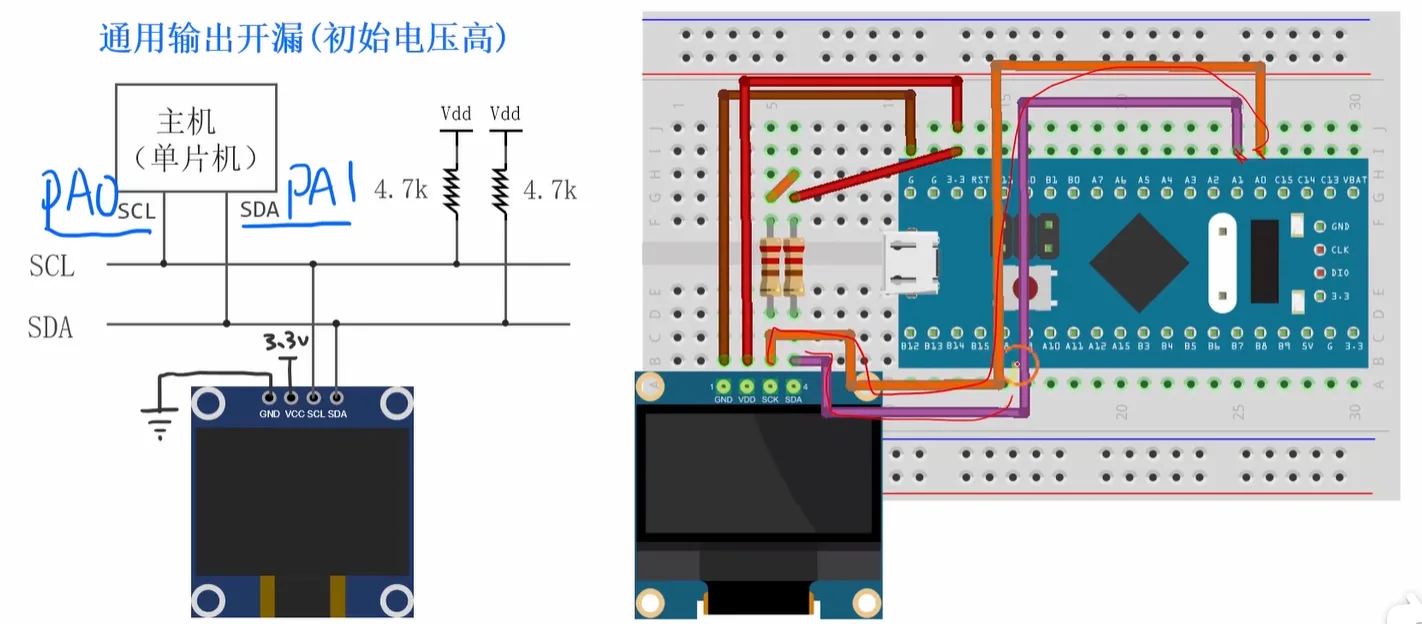
IO引脚初始化
封装函数
My_SI2C_Init
void My_SI2C_Init(void);

void My_SI2C_Init(void)
{
    RCC_APB2PeriphClockCmd(RCC_APB2Periph_GPIOA, ENABLE);

    GPIO_InitTypeDef GPIO_InitStruct;

    GPIO_InitStruct.GPIO_Pin = GPIO_Pin_0 | GPIO_Pin_1;
    GPIO_InitStruct.GPIO_Mode = GPIO_Mode_Out_OD;
    GPIO_InitStruct.GPIO_Speed = GPIO_Speed_2MHz;

    GPIO_Init(GPIOA, &GPIO_InitStruct);

    GPIO_WriteBit(GPIOA, GPIO_Pin_0, Bit_SET);
    GPIO_WriteBit(GPIOA, GPIO_Pin_1, Bit_SET);
}
IO读写和延迟函数
scl_write
在引脚上写值
void scl_write(uint8_t level);

void scl_write(uint8_t level)
{
    // PA0
    if (level == 0)
    {
        GPIO_WriteBit(GPIOA, GPIO_Pin_0, Bit_RESET);
    }
    else
    {
        GPIO_WriteBit(GPIOA, GPIO_Pin_0, Bit_SET);
    }
}
sda_write
在引脚上写值
void sda_write(uint8_t level);

void sda_write(uint8_t level)
{
    // PA1
    if (level == 0)
    {
        GPIO_WriteBit(GPIOA, GPIO_Pin_1, Bit_RESET);
    }
    else
    {
        GPIO_WriteBit(GPIOA, GPIO_Pin_1, Bit_SET);
    }
}
sda_read
读取SDA线上的高低电压
uint8_t sda_read(void);

uint8_t sda_read(void)
{
    if (GPIO_ReadInputDataBit(GPIOA, GPIO_Pin_1) == Bit_SET)
    {
        return 1;
    }
    else
    {
        return 0;
    }
}
delay_us
微秒级延迟
void delay_us(uint32_t us);

void delay_us(uint32_t us)
{
    uint32_t n = us * 8;
    for(uint32_t i=0; i<n; i++);
}
发送起始位和停止位
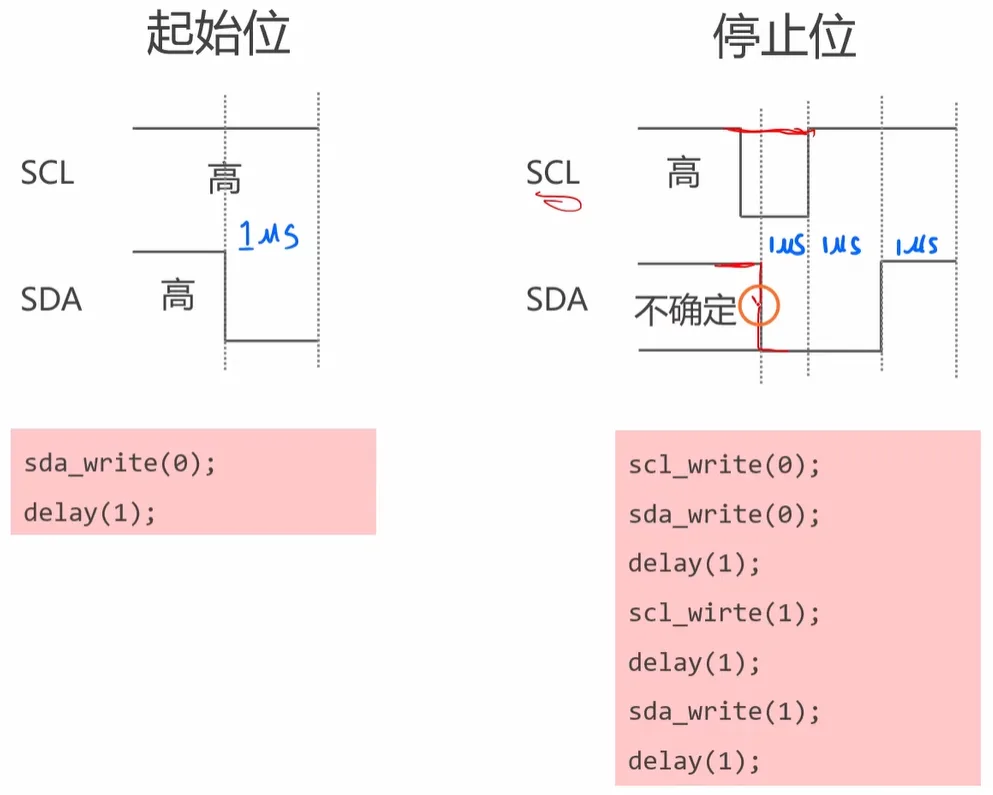
SendStart
发送起始位
void SendStart(void);

void SendStart(void)
{
    // I2C起始条件标准时序:SCL高时SDA从高→低跳变
    sda_write(0);
    delay_us(1);
}
SendStop
发送停止位
void SendStop(void);

void SendStop(void)
{
    scl_write(0);
    sda_write(0);
    delay_us(1);

    scl_write(1);
    delay_us(1);

    sda_write(1);
    delay_us(1);
}
发送一个字节
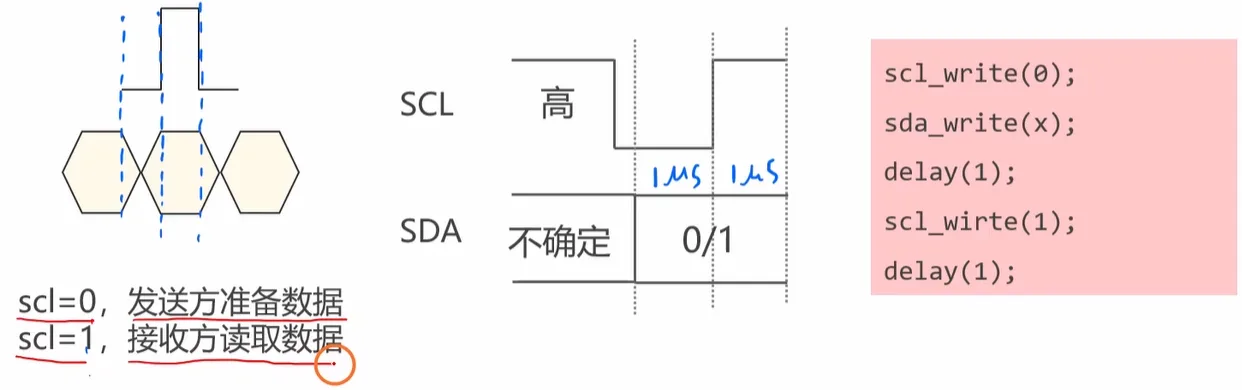
SendByte
uint8_t SendByte(uint8_t Byte);

uint8_t SendByte(uint8_t Byte)
{
    for(int8_t i=7; i>=0; i--)
    {
        scl_write(0);
        if((Byte & (0x01 << i)) != 0)
        {
            sda_write(1);
        }
        else
        {
            sda_write(0);
        }
        delay_us(1);
        scl_write(1);
        delay_us(1);
    }

    // 读取ACK或者NAK
    scl_write(0);
    sda_write(1);
    delay_us(1);
    scl_write(1);
    delay_us(1);
    return sda_read();
}
接收一个字节
ReceiveByte
uint8_t ReceiveByte(uint8_t Ack);

uint8_t ReceiveByte(uint8_t Ack)
{
    uint8_t byte = 0;
    for(int8_t i=7; i>=0; i--)
    {
        scl_write(0);
        sda_write(1);
        delay_us(1);
        scl_write(1);
        delay_us(1);

        if(sda_read() != 0)
        {
            byte |= (0x01 << i);
        }
    }

    scl_write(0);
    sda_write(!Ack);
    delay_us(1);
    scl_write(1);
    delay_us(1);

    return byte;
}
综合
My_SI2C_SendBytes
int My_SI2C_SendBytes(uint8_t Addr, uint8_t *pData, uint16_t Size);

int My_SI2C_SendBytes(uint8_t Addr, uint8_t *pData, uint16_t Size)
{
    SendStart();

    if(SendByte(Addr & 0xfe) != 0)
    {
        SendStop();
        return -1;
    }

    for(uint32_t i=0; i<Size; i++)
    {
        if(SendByte(pData[i]) != 0)
        {
            SendStop();
            return -2;
        }
    }

    SendStop();
    return 0;
}
My_SI2C_ReceiveBytes
int My_SI2C_ReceiveBytes(uint8_t Addr, uint8_t *pBuffer, uint16_t Size);

int My_SI2C_ReceiveBytes(uint8_t Addr, uint8_t *pBuffer, uint16_t Size)
{
    SendStart();

    if(SendByte(Addr | 0x01) != 0)
    {
        SendStop();
        return -1;
    }

    for(uint32_t i=0; i<Size-1; i++)
    {
        pBuffer[i] = ReceiveByte(1);
    }

    pBuffer[Size-1] = ReceiveByte(0);

    SendStop();
    return 0;
}
测试
完整实验代码
#include "stm32f10x.h"

void My_SI2C_Init(void);
void scl_write(uint8_t level);
void sda_write(uint8_t level);
uint8_t sda_read(void);
void delay_us(uint32_t us);
void SendStart(void);
void SendStop(void);
uint8_t SendByte(uint8_t Byte);
uint8_t ReceiveByte(uint8_t Ack);

int My_SI2C_SendBytes(uint8_t Addr, uint8_t *pData, uint16_t Size);
int My_SI2C_ReceiveBytes(uint8_t Addr, uint8_t *pBuffer, uint16_t Size);

int main(void)
{
    My_SI2C_Init();

    uint8_t commands[] = {
    0x00,  // 命令流
    0x8d, 0x14,  // 使能电荷泵
    0xaf,  // 打开屏幕开关
    0xa5   // 让屏幕全亮
    };

    My_SI2C_SendBytes(0x78, commands, 5);

    while(1)
    {

    }
}

void My_SI2C_Init(void)
{
    RCC_APB2PeriphClockCmd(RCC_APB2Periph_GPIOA, ENABLE);

    GPIO_InitTypeDef GPIO_InitStruct;

    GPIO_InitStruct.GPIO_Pin = GPIO_Pin_0 | GPIO_Pin_1;
    GPIO_InitStruct.GPIO_Mode = GPIO_Mode_Out_OD;
    GPIO_InitStruct.GPIO_Speed = GPIO_Speed_2MHz;

    GPIO_Init(GPIOA, &GPIO_InitStruct);

    GPIO_WriteBit(GPIOA, GPIO_Pin_0, Bit_SET);
    GPIO_WriteBit(GPIOA, GPIO_Pin_1, Bit_SET);
}

void scl_write(uint8_t level)
{
    // PA0
    if (level == 0)
    {
        GPIO_WriteBit(GPIOA, GPIO_Pin_0, Bit_RESET);
    }
    else
    {
        GPIO_WriteBit(GPIOA, GPIO_Pin_0, Bit_SET);
    }
}

void sda_write(uint8_t level)
{
    // PA1
    if (level == 0)
    {
        GPIO_WriteBit(GPIOA, GPIO_Pin_1, Bit_RESET);
    }
    else
    {
        GPIO_WriteBit(GPIOA, GPIO_Pin_1, Bit_SET);
    }
}

uint8_t sda_read(void)
{
    if (GPIO_ReadInputDataBit(GPIOA, GPIO_Pin_1) == Bit_SET)
    {
        return 1;
    }
    else
    {
        return 0;
    }
}

void delay_us(uint32_t us)
{
    uint32_t n = us * 8;
    for(uint32_t i=0; i<n; i++);
}

void SendStart(void)
{
    // I2C起始条件标准时序:SCL高时SDA从高→低跳变
    sda_write(0);
    delay_us(1);
}

void SendStop(void)
{
    scl_write(0);
    sda_write(0);
    delay_us(1);

    scl_write(1);
    delay_us(1);

    sda_write(1);
    delay_us(1);
}

uint8_t SendByte(uint8_t Byte)
{
    for(int8_t i=7; i>=0; i--)
    {
        scl_write(0);
        if((Byte & (0x01 << i)) != 0)
        {
            sda_write(1);
        }
        else
        {
            sda_write(0);
        }
        delay_us(1);
        scl_write(1);
        delay_us(1);
    }

    // 读取ACK或者NAK
    scl_write(0);
    sda_write(1);
    delay_us(1);
    scl_write(1);
    delay_us(1);
    return sda_read();
}

uint8_t ReceiveByte(uint8_t Ack)
{
    uint8_t byte = 0;
    for(int8_t i=7; i>=0; i--)
    {
        scl_write(0);
        sda_write(1);
        delay_us(1);
        scl_write(1);
        delay_us(1);

        if(sda_read() != 0)
        {
            byte |= (0x01 << i);
        }
    }

    scl_write(0);
    sda_write(!Ack);
    delay_us(1);
    scl_write(1);
    delay_us(1);

    return byte;
}

int My_SI2C_SendBytes(uint8_t Addr, uint8_t *pData, uint16_t Size)
{
    SendStart();

    if(SendByte(Addr & 0xfe) != 0)
    {
        SendStop();
        return -1;
    }

    for(uint32_t i=0; i<Size; i++)
    {
        if(SendByte(pData[i]) != 0)
        {
            SendStop();
            return -2;
        }
    }

    SendStop();
    return 0;
}

int My_SI2C_ReceiveBytes(uint8_t Addr, uint8_t *pBuffer, uint16_t Size)
{
    SendStart();

    if(SendByte(Addr | 0x01) != 0)
    {
        SendStop();
        return -1;
    }

    for(uint32_t i=0; i<Size-1; i++)
    {
        pBuffer[i] = ReceiveByte(1);
    }

    pBuffer[Size-1] = ReceiveByte(0);

    SendStop();
    return 0;
}
4.7 [I2C]封装常用功能
测试硬件I2C
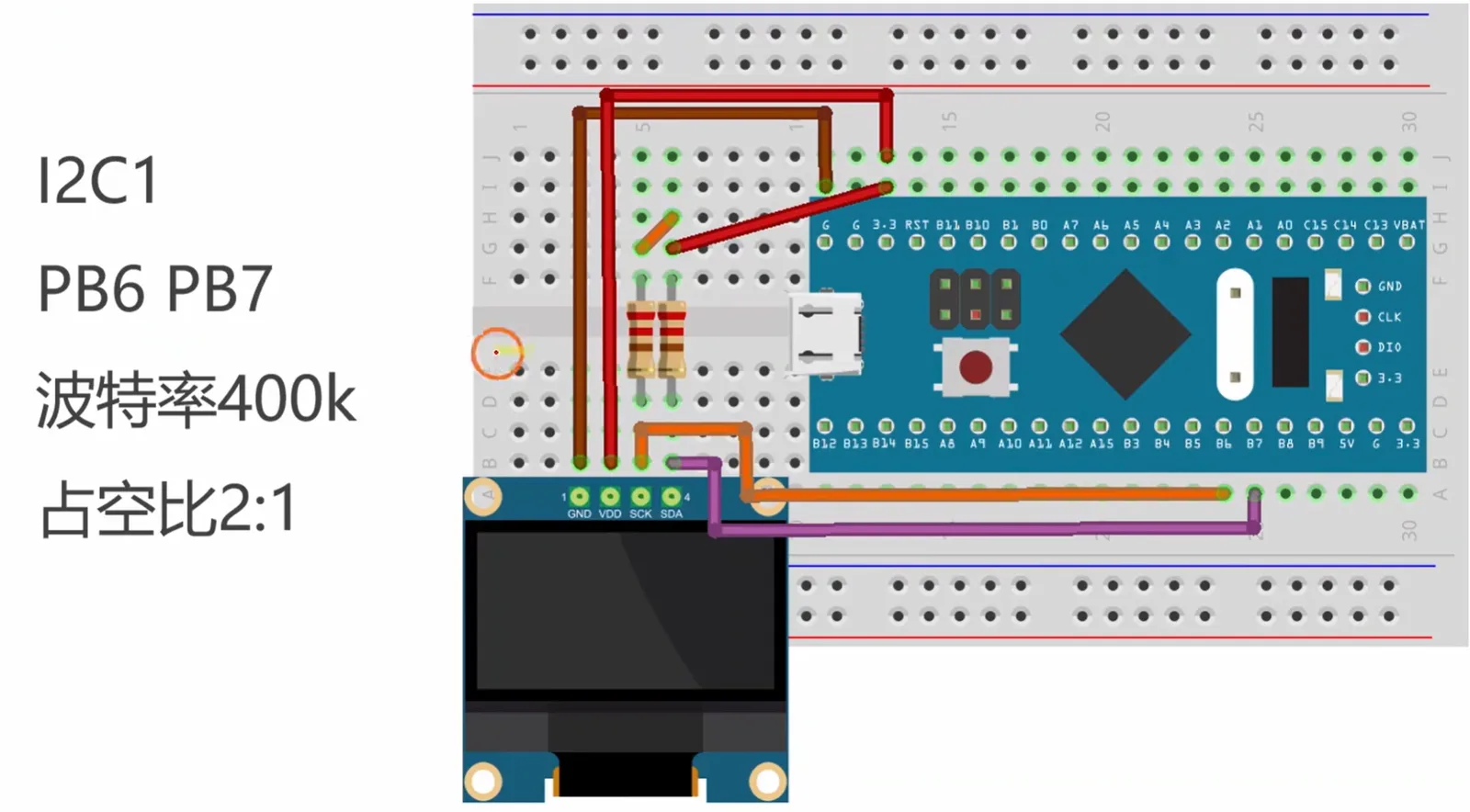
完整实验代码
#include "stm32f10x.h"
#include "i2c.h"

void My_I2C1_Init(void);
void My_OnBoardLED_Init(void);

int main(void)
{
    My_I2C1_Init();
    My_OnBoardLED_Init();

    uint8_t commands[] = {0x00, 0x8d, 0x14, 0xaf, 0xa5};

    My_I2C_SendBytes(I2C1, 0x78, commands, 5);

    uint8_t rcvd;

    My_I2C_ReceiveBytes(I2C1, 0x78, &rcvd, 1);

    if((rcvd & (0x01 << 6)) == 0)
    {
        GPIO_WriteBit(GPIOC, GPIO_Pin_13, Bit_RESET);
    }
    else
    {
        GPIO_WriteBit(GPIOC, GPIO_Pin_13, Bit_SET);
    }

    while(1)
    {
    }
}

void My_I2C1_Init(void)
{
    // #1. 对PB6和PB7进行初始化
    RCC_APB2PeriphClockCmd(RCC_APB2Periph_GPIOB, ENABLE);

    GPIO_InitTypeDef GPIO_InitStruct;
    GPIO_InitStruct.GPIO_Pin = GPIO_Pin_6 | GPIO_Pin_7;
    GPIO_InitStruct.GPIO_Mode = GPIO_Mode_AF_OD;
    GPIO_InitStruct.GPIO_Speed = GPIO_Speed_2MHz;
    GPIO_Init(GPIOB, &GPIO_InitStruct);

    // #2. 对I2C1进行初始化
    RCC_APB1PeriphClockCmd(RCC_APB1Periph_I2C1, ENABLE);
    RCC_APB1PeriphResetCmd(RCC_APB1Periph_I2C1, ENABLE);
    RCC_APB1PeriphResetCmd(RCC_APB1Periph_I2C1, DISABLE);

    I2C_InitTypeDef I2C_InitStruct;
    I2C_InitStruct.I2C_ClockSpeed = 400000;
    I2C_InitStruct.I2C_Mode = I2C_Mode_I2C;
    I2C_InitStruct.I2C_DutyCycle = I2C_DutyCycle_2;
    I2C_Init(I2C1, &I2C_InitStruct);

    I2C_Cmd(I2C1, ENABLE);
}

void My_OnBoardLED_Init(void)
{
    RCC_APB2PeriphClockCmd(RCC_APB2Periph_GPIOC, ENABLE);

    GPIO_InitTypeDef GPIO_InitStruct;
    GPIO_InitStruct.GPIO_Pin = GPIO_Pin_13;
    GPIO_InitStruct.GPIO_Mode = GPIO_Mode_Out_OD;
    GPIO_InitStruct.GPIO_Speed = GPIO_Speed_2MHz;

    GPIO_Init(GPIOC, &GPIO_InitStruct);

    GPIO_WriteBit(GPIOC, GPIO_Pin_13, Bit_SET);
}
测试软件I2C
完整实验代码
#include "stm32f10x.h"
#include "si2c.h"

void My_OnBoardLED_Init(void);

SI2C_TypeDef si2c;

int main(void)
{
    si2c.SCL_GPIOx = GPIOB;
    si2c.SCL_GPIO_Pin = GPIO_Pin_6;
    si2c.SDA_GPIOx = GPIOB;
    si2c.SDA_GPIO_Pin = GPIO_Pin_7;
    My_SI2C_Init(&si2c);

    My_OnBoardLED_Init();

    uint8_t commands[] = {0x00, 0x8d, 0x14, 0xaf, 0xa5};

    My_SI2C_SendBytes(&si2c, 0x78, commands, 5);

    uint8_t rcvd;

    My_SI2C_ReceiveBytes(&si2c, 0x78, &rcvd, 1);

    if((rcvd & (0x01 << 6)) == 0)
    {
        GPIO_WriteBit(GPIOC, GPIO_Pin_13, Bit_RESET);
    }
    else
    {
        GPIO_WriteBit(GPIOC, GPIO_Pin_13, Bit_SET);
    }

    while(1)
    {
    }
}

void My_OnBoardLED_Init(void)
{
    RCC_APB2PeriphClockCmd(RCC_APB2Periph_GPIOC, ENABLE);

    GPIO_InitTypeDef GPIO_InitStruct;
    GPIO_InitStruct.GPIO_Pin = GPIO_Pin_13;
    GPIO_InitStruct.GPIO_Mode = GPIO_Mode_Out_OD;
    GPIO_InitStruct.GPIO_Speed = GPIO_Speed_2MHz;

    GPIO_Init(GPIOC, &GPIO_InitStruct);

    GPIO_WriteBit(GPIOC, GPIO_Pin_13, Bit_SET);
}
4.8 [I2C]OLED显示器
中文不显示问题
- 打开 Keil MDK,点击顶部菜单栏的
Edit(编辑) →Configuration(配置); - 在弹出的配置窗口中,选择左侧的
Editor(编辑器)选项卡; - 找到
Encoding(编码)下拉框: - 选择
UTF-8(推荐),或UTF-8 (without BOM)(无字节序标记,兼容性更好); - 若下拉框中无 UTF-8 选项,需升级 Keil 到 5.28 及以上版本(旧版本不支持 UTF-8);
- 勾选
Apply to all open files(应用到所有打开的文件),点击OK保存设置; - 最后,将乱码重新改为想要输入的汉字,重新编译、烧录,即可看到汉字正常显示。
OLED的基本原理
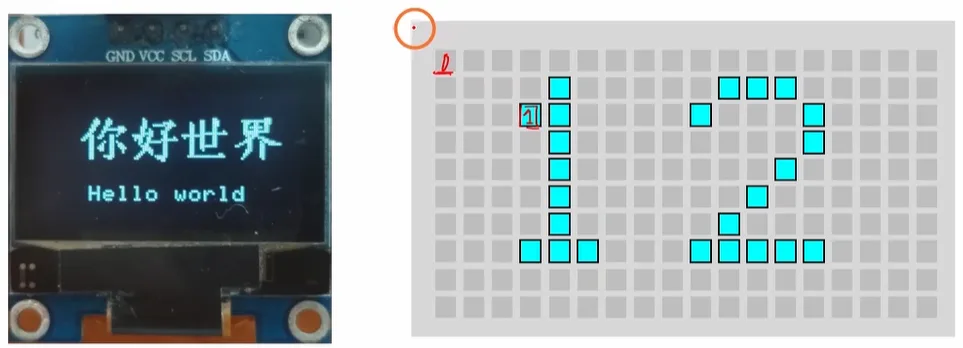
- 自发光:OLED 由有机发光材料制成,不需要背光,给对应像素通电就会自己发光。
- 点阵成像:屏幕由无数个微小像素点组成,控制每个像素亮 / 灭,就能拼出文字、图标、图形。
- 驱动方式:通过驱动芯片(如 SSD1306)接收指令,按行 / 列选中像素,决定哪些点亮、哪些灭,形成完整画面。
屏幕初始化
初始化软I2C
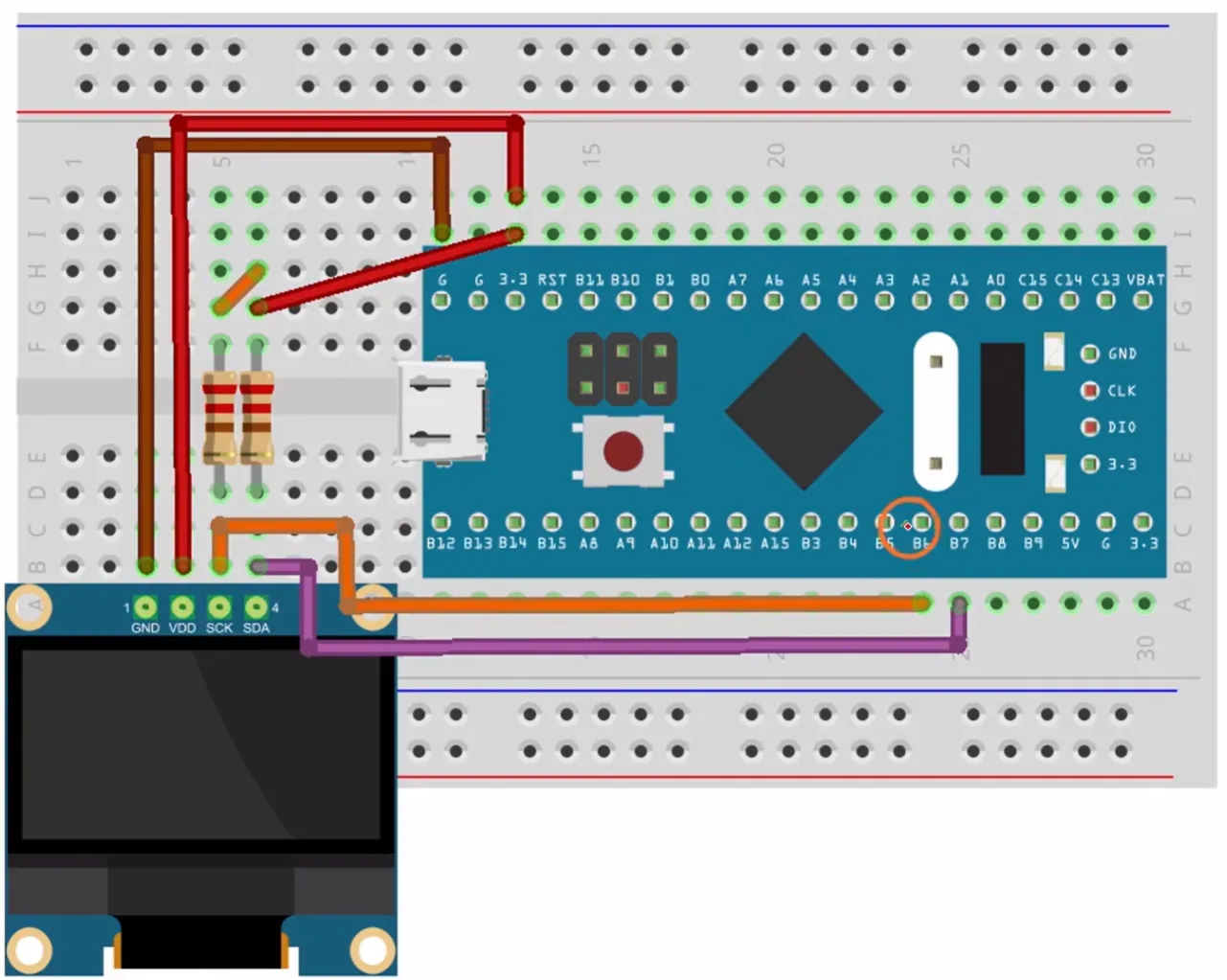
OLED编程接口
- OLED 初始化函数接口
int OLED_Init(OLED_TypeDef *OLED,        // 所使用的OLED实例指针
OLED_InitTypeDef *OLED_InitStruct); // OLED初始化参数结构体指针- 功能:对 OLED 显示器进行硬件与软件初始化
- 参数:
OLED:指向具体 OLED 设备实例的指针OLED_InitStruct:包含初始化配置(如 I2C 回调函数)的结构体指针- 返回值:
int类型,通常用于表示初始化成功 / 失败状态
- 初始化参数结构体与 I2C 回调函数接口
struct OLED_InitTypeDef {
    // I2C写数据回调函数指针
    int (*i2c_write_cb)(uint8_t addr, const uint8_t *pdata, uint16_t size);
};核心成员:i2c_write_cb 是一个函数指针,用于绑定底层 I2C 写数据实现
回调函数签名:
int i2c_write_callback(uint8_t addr,        // I2C设备7位/8位地址
                        const uint8_t *pdata, // 待发送数据缓冲区指针
uint16_t size); // 待发送数据长度- 功能:底层 I2C 总线写数据实现,由用户根据硬件平台编写
- 返回值:
int类型,通常返回 0 表示成功,非 0 表示错误
屏幕初始化代码的编写
#include "stm32f10x.h"
#include "si2c.h"
#include "oled.h"

SI2C_TypeDef si2c;
OLED_TypeDef oled;

void My_SoftwareI2C_Init(void);
void My_OLEDInit(void);
int i2c_write_bytes(uint8_t addr, const uint8_t *pdata, uint16_t size);

int main(void)
{
    My_SoftwareI2C_Init(); // 对软I2C进行初始化
    My_OLEDScreen_Init(); // 对OLED显示器进行初始化

    while(1)
    {
    }
}

void My_SoftwareI2C_Init(void)
{
    si2c.SCL_GPIOx = GPIOB;
    si2c.SCL_GPIO_Pin = GPIO_Pin_6;
    si2c.SDA_GPIOx = GPIOB;
    si2c.SDA_GPIO_Pin = GPIO_Pin_7;

    My_SI2C_Init(&si2c);
}

int i2c_write_bytes(uint8_t addr, const uint8_t *pdata, uint16_t size)
{
    return My_SI2C_SendBytes(&si2c, addr, pdata, size);
}

void My_OLEDScreen_Init(void)
{
    OLED_InitTypeDef OLED_InitStruct;

    OLED_InitStruct.i2c_write_cb = i2c_write_bytes;

    OLED_Init(&oled, &OLED_InitStruct);
}
基本概念和操作
画笔和画刷
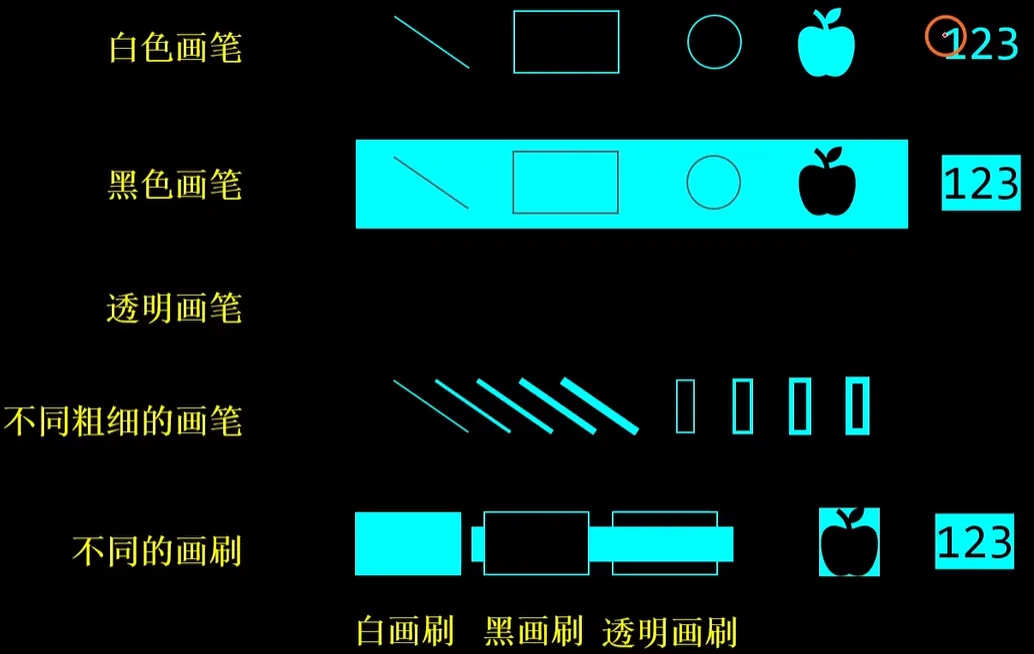
屏幕坐标系
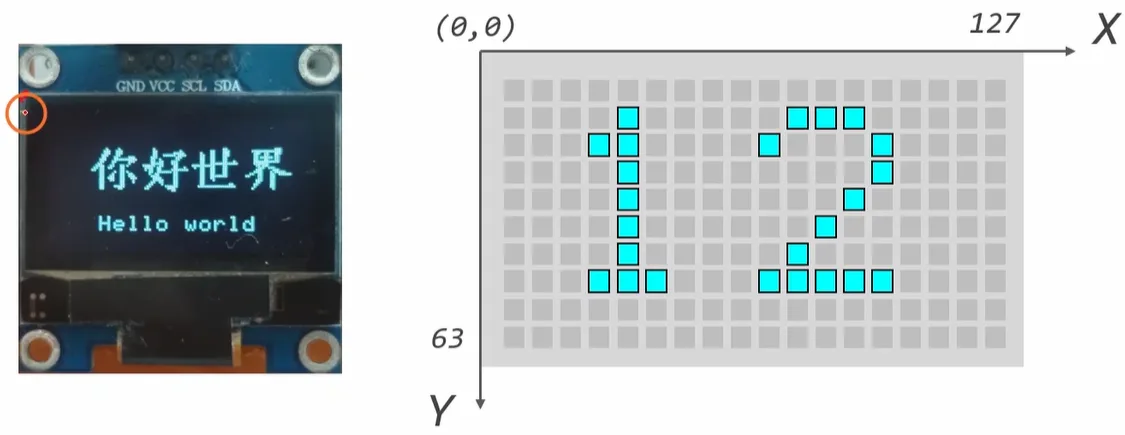
光标
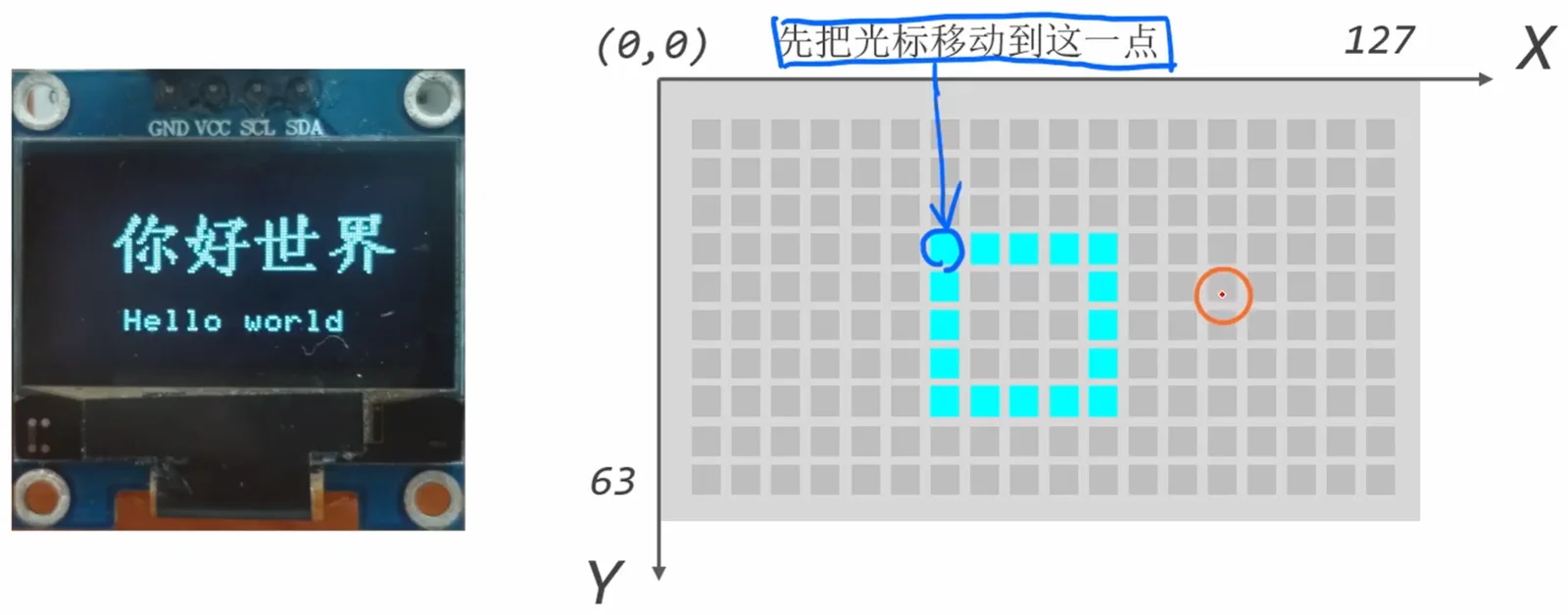
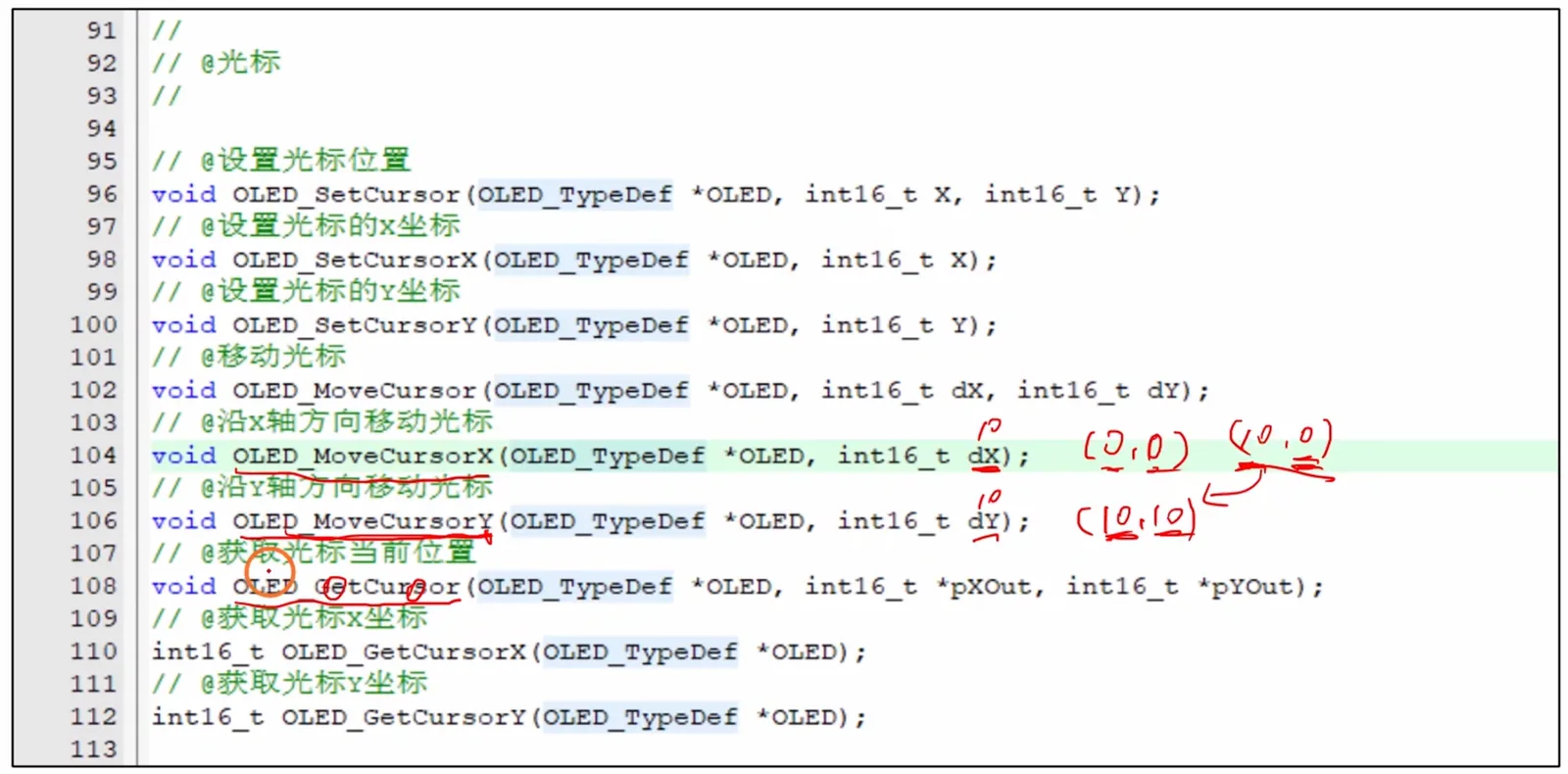
文字相关的操作
打印字符串
- 核心字符串绘制函数
int OLED_DrawString(OLED_TypeDef *OLED, const char *Str);- 功能:在 OLED 屏幕上绘制指定字符串
- 参数:
OLED:指向OLED_TypeDef类型设备实例的指针(用于指定操作的 OLED 设备)Str:指向要显示的 C 风格字符串的指针(const char*类型,保证字符串内容不可修改)- 返回值:
int类型(通常用于返回操作状态或错误码)
- 配套设置函数
// 设置画刷样式
void OLED_SetBrush(OLED_TypeDef *OLED, /* 画刷类型枚举 */ brush_type_t brush);

// 设置画笔属性(颜色+线宽)
void OLED_SetPen(OLED_TypeDef *OLED, /* 画笔颜色枚举 */ pen_color_t color, uint8_t width);

// 设置绘制光标位置(起始坐标)
void OLED_SetCursor(OLED_TypeDef *OLED, uint16_t x, uint16_t y);示例参数值:
BRUSH_TRANSPARENT:透明画刷(不填充背景)PEN_COLOR_WHITE:白色画笔width=1:画笔宽度为 1 像素x=24, y=50:光标位置为 (24,50)
打印 hello world
#include "stm32f10x.h"
#include "si2c.h"
#include "oled.h"

SI2C_TypeDef si2c;
OLED_TypeDef oled;

void My_SoftwareI2C_Init(void);
void My_OLEDScreen_Init(void);
int i2c_write_bytes(uint8_t addr, const uint8_t *pdata, uint16_t size);

int main(void)
{
    My_SoftwareI2C_Init(); // 对软I2C进行初始化
    My_OLEDScreen_Init(); // 对OLED显示器进行初始化

    // #1. 打印Hello world
    OLED_SetPen(&oled, PEN_COLOR_WHITE, 1);    // 设置白画笔
    OLED_SetBrush(&oled, PEN_COLOR_TRANSPARENT); // 透明画刷
    OLED_SetCursor(&oled, 24, 50);             // 设置光标
    OLED_DrawString(&oled, "Hello world");
    OLED_SendBuffer(&oled);

    while(1)
    {
    }
}

void My_SoftwareI2C_Init(void)
{
    si2c.SCL_GPIOx = GPIOB;
    si2c.SCL_GPIO_Pin = GPIO_Pin_6;
    si2c.SDA_GPIOx = GPIOB;
    si2c.SDA_GPIO_Pin = GPIO_Pin_7;

    My_SI2C_Init(&si2c);
}

int i2c_write_bytes(uint8_t addr, const uint8_t *pdata, uint16_t size)
{
    return My_SI2C_SendBytes(&si2c, addr, pdata, size);
}

void My_OLEDScreen_Init(void)
{
    OLED_InitTypeDef OLED_InitStruct;

    OLED_InitStruct.i2c_write_cb = i2c_write_bytes;

    OLED_Init(&oled, &OLED_InitStruct);
}
设置字体
“开始”中搜索“字体”,找到字体的路径,复制字体
在 mylib/font/ttfttc 中粘贴字体
在 mylib/font/.map 中替换为目标字体
双击运行 ttf2c.exe
simsunb 16 simsunb16
- 核心函数接口
// 设置字体
void OLED_SetFont(OLED_TypeDef *OLED, const Font_TypeDef *font);

// 获取屏幕宽度(像素)
uint16_t OLED_GetScreenWidth(OLED_TypeDef *OLED);

// 获取字符串的显示宽度(像素)
uint16_t OLED_GetStrWidth(OLED_TypeDef *OLED, const char *str);

// 设置光标位置
void OLED_SetCursor(OLED_TypeDef *OLED, uint16_t x, uint16_t y);

// 绘制字符串
int OLED_DrawString(OLED_TypeDef *OLED, const char *str);- 代码示例与功能说明
// 设置使用16号汉字字体(hyjk16)
OLED_SetFont(&oled, &hyjk16);

// 计算让字符串水平居中的x坐标:(屏幕宽度 - 字符串宽度) / 2
uint16_t x = (OLED_GetScreenWidth(&oled) - OLED_GetStrWidth(&oled, "你好世界")) / 2;

// 将光标设置到(x, 28)位置
OLED_SetCursor(&oled, x, 28);

// 在当前光标位置绘制字符串"你好世界"
OLED_DrawString(&oled, "你好世界");OLED_SetFont:指定后续绘制字符串所使用的字体(这里是 16 像素高度的汉字字体hyjk16)OLED_GetScreenWidth:返回 OLED 屏幕的横向像素总数,用于计算居中位置OLED_GetStrWidth:返回指定字符串在当前字体下的显示像素宽度,用于精确排版OLED_SetCursor:设置字符串绘制的起始坐标(x, y)OLED_DrawString:在光标位置绘制目标字符串
格式化打印字符串
// #3. 格式化打印当前日期
OLED_SetFont(&oled, &default_font);
OLED_SetCursor(&oled, 58, 64);
OLED_Printf(&oled, "%04/%02/%02", 2026, 10, 26);
设置文本区域
// @开启文本区域
void OLED_StartTextRegion(OLED_TypeDef *OLED, int16_t X, int16_t Y, uint16_t Width, uint16_t Height);

// @停止文本区域
void OLED_StopTextRegion(OLED_TypeDef *OLED);OLED_StartTextRegion:用于在 OLED 屏幕上划定一个矩形文本区域,参数分别为:OLED 设备指针、区域左上角 X 坐标、Y 坐标、区域宽度、区域高度。OLED_StopTextRegion:用于结束当前文本区域,恢复全屏显示模式。- 图中演示了区域内文本与全局文本的区别:区域内只显示限定范围内的文字,超出部分会被截断。
示例
OLED_StartTextRegion(&oled, 0, 0, 128, 64);

OLED_DrawString(&oled, "There was a man named Jhon.\r\n");
OLED_DrawString(&oled, "He was 70 years old.\r\n");
OLED_DrawString(&oled, "He really liked the name of Jhon.\r\n");
OLED_DrawString(&oled, "But didn't like the age of 70.\r\n");

OLED_SendBuffer(&oled); // 将缓冲区发送到屏幕上
实验代码
#include "stm32f10x.h"
#include "si2c.h"
#include "oled.h"
#include "simsunb16.h"

SI2C_TypeDef si2c;
OLED_TypeDef oled;

void My_SoftwareI2C_Init(void);
void My_OLEDScreen_Init(void);
int i2c_write_bytes(uint8_t addr, const uint8_t *pdata, uint16_t size);

int main(void)
{
    My_SoftwareI2C_Init(); // 对软I2C进行初始化
    My_OLEDScreen_Init(); // 对OLED显示器进行初始化

    // #4. 设置文本区域
    OLED_StartTextRegion(&oled, 0, 0, 128, 64);

    OLED_DrawString(&oled, "There was a man named John. \r\n");
    OLED_DrawString(&oled, "He was 70 years old. \r\n");
    OLED_DrawString(&oled, "He really liked his name of John. \r\n");
    OLED_DrawString(&oled, "But didn't like the age of 70. \r\n");

    OLED_SendBuffer(&oled);

    OLED_SendBuffer(&oled);

    while(1)
    {
    }
}

void My_SoftwareI2C_Init(void)
{
    si2c.SCL_GPIOx = GPIOB;
    si2c.SCL_GPIO_Pin = GPIO_Pin_6;
    si2c.SDA_GPIOx = GPIOB;
    si2c.SDA_GPIO_Pin = GPIO_Pin_7;

    My_SI2C_Init(&si2c);
}

int i2c_write_bytes(uint8_t addr, const uint8_t *pdata, uint16_t size)
{
    return My_SI2C_SendBytes(&si2c, addr, pdata, size);
}

void My_OLEDScreen_Init(void)
{
    OLED_InitTypeDef OLED_InitStruct;

    OLED_InitStruct.i2c_write_cb = i2c_write_bytes;

    OLED_Init(&oled, &OLED_InitStruct);
}
绘图相关的操作
画点
PAL_OLED_DrawDot
// @简介:在光标所在位置画点
void PAL_OLED_DrawDot(PalOLED_HandleTypeDef *Handle);
示例代码
OLED_SetPen(&oled, PEN_COLOR_WHITE, 3); // 画笔3
OLED_SetCursor(&oled, 29, 32);          // 光标移动到第一个点
OLED_DrawDot(&oled);                    // 画点

// 画剩下的7个点
for(uint32_t i = 1; i < 8; i++)
{
    OLED_MoveCursorX(&oled, 10);  // 光标左移10像素
    OLED_DrawDot(&oled);          // 画点
}
功能说明
PAL_OLED_DrawDot:在当前光标位置绘制一个点,绘制样式由之前设置的画笔(颜色、粗细)决定。OLED_SetPen:设置画笔属性,这里设置为白色、3 像素粗细。OLED_SetCursor:将光标移动到指定坐标(29, 32)。OLED_MoveCursorX:在当前光标基础上,沿 X 轴左移 10 像素。- 示例逻辑:先画第 1 个点,再通过循环左移光标并重复画点,最终画出共 8 个水平排列的点。
实验代码
#include "stm32f10x.h"
#include "si2c.h"
#include "oled.h"
#include "simsunb16.h"

SI2C_TypeDef si2c;
OLED_TypeDef oled;

void My_SoftwareI2C_Init(void);
void My_OLEDScreen_Init(void);
int i2c_write_bytes(uint8_t addr, const uint8_t *pdata, uint16_t size);

int main(void)
{
    My_SoftwareI2C_Init(); // 对软I2C进行初始化
    My_OLEDScreen_Init(); // 对OLED显示器进行初始化

    // #5. 画点
    OLED_SetPen(&oled, PEN_COLOR_WHITE, 3);
    OLED_SetCursor(&oled, 29, 32);
    OLED_DrawDot(&oled);

    for(uint8_t i=1; i<8; i++)
    {
        OLED_MoveCursorX(&oled, 10);
        OLED_DrawDot(&oled);
    }

    OLED_SendBuffer(&oled);

    while(1)
    {
    }
}

void My_SoftwareI2C_Init(void)
{
    si2c.SCL_GPIOx = GPIOB;
    si2c.SCL_GPIO_Pin = GPIO_Pin_6;
    si2c.SDA_GPIOx = GPIOB;
    si2c.SDA_GPIO_Pin = GPIO_Pin_7;

    My_SI2C_Init(&si2c);
}

int i2c_write_bytes(uint8_t addr, const uint8_t *pdata, uint16_t size)
{
    return My_SI2C_SendBytes(&si2c, addr, pdata, size);
}

void My_OLEDScreen_Init(void)
{
    OLED_InitTypeDef OLED_InitStruct;

    OLED_InitStruct.i2c_write_cb = i2c_write_bytes;

    OLED_Init(&oled, &OLED_InitStruct);
}
画线
OLED_DrawLine
// @简介:从光标的当前位置到(x,y)画线
void OLED_DrawLine(OLED_TypeDef *OLED, u16 x, u16 y);
OLED_LineTo
// @简介:从光标的当前位置到(x,y)画线,并把光标移动到(x,y)
void OLED_LineTo(OLED_TypeDef *OLED, u16 x, u16 y);
示例代码
OLED_SetCursor(&oled, 0, 0);  // 光标移动到左上角
OLED_DrawLine(&oled, 127, 63); // 画线

OLED_SetCursor(&oled, 0, 63); // 光标移动到左下角
OLED_DrawLine(&oled, 127, 0); // 画线OLED_SetCursor(&oled, 84, 22); // 移动光标
OLED_LineTo(&oled, 44, 22); // 画线
OLED_LineTo(&oled, 44, 42); // 画线
OLED_LineTo(&oled, 84, 42); // 画线功能说明
OLED_DrawLine:从当前光标位置到目标坐标(x,y)画一条线,光标位置保持不变。OLED_LineTo:从当前光标位置到目标坐标(x,y)画一条线,同时将光标移动到(x,y),适合连续绘制折线。- 示例效果:
- 先画两条对角线(从左上到右下、从左下到右上),构成一个 X 形。
- 再用
LineTo连续绘制一个矩形的三条边(右→左→下→右)。
实验代码
#include "stm32f10x.h"
#include "si2c.h"
#include "oled.h"
#include "simsunb16.h"

SI2C_TypeDef si2c;
OLED_TypeDef oled;

void My_SoftwareI2C_Init(void);
void My_OLEDScreen_Init(void);
int i2c_write_bytes(uint8_t addr, const uint8_t *pdata, uint16_t size);

int main(void)
{
    My_SoftwareI2C_Init(); // 对软I2C进行初始化
    My_OLEDScreen_Init(); // 对OLED显示器进行初始化

    // #6. 画线
    OLED_SetCursor(&oled, 0, 0);
    OLED_DrawLine(&oled, 128, 64);

    OLED_SetCursor(&oled, 0, 64);
    OLED_DrawLine(&oled, 128, 0);

    OLED_SetCursor(&oled, 84, 22);
    OLED_LineTo(&oled, 44, 22);
    OLED_LineTo(&oled, 44, 42);
    OLED_LineTo(&oled, 84, 42);

    OLED_SendBuffer(&oled);

    while(1)
    {
    }
}

void My_SoftwareI2C_Init(void)
{
    si2c.SCL_GPIOx = GPIOB;
    si2c.SCL_GPIO_Pin = GPIO_Pin_6;
    si2c.SDA_GPIOx = GPIOB;
    si2c.SDA_GPIO_Pin = GPIO_Pin_7;

    My_SI2C_Init(&si2c);
}

int i2c_write_bytes(uint8_t addr, const uint8_t *pdata, uint16_t size)
{
    return My_SI2C_SendBytes(&si2c, addr, pdata, size);
}

void My_OLEDScreen_Init(void)
{
    OLED_InitTypeDef OLED_InitStruct;

    OLED_InitStruct.i2c_write_cb = i2c_write_bytes;

    OLED_Init(&oled, &OLED_InitStruct);
}
画矩形和画圆
OLED_DrawRect
// @简介:画矩形
void OLED_DrawRect(OLED_TypeDef *OLED, u16 width, u16 height);
OLED_DrawCircle
// @简介:画圆
void OLED_DrawCircle(OLED_TypeDef *OLED, u16 radius);
示例代码
// 矩形1
OLED_SetCursor(&oled, 20, 20);
OLED_SetPen(&oled, PEN_COLOR_WHITE, 1);
OLED_SetBrush(&oled, BRUSH_TRANSPARENT);
OLED_DrawRect(&oled, 40, 20);

// 圆
OLED_SetCursor(&oled, 65, 30);
OLED_DrawCircle(&oled, 5);

// 矩形2
OLED_SetCursor(&oled, 70, 20);
OLED_SetPen(&oled, PEN_COLOR_WHITE, 1);
OLED_SetBrush(&oled, BRUSH_WHITE);
OLED_DrawRect(&oled, 40, 20);
功能说明
OLED_DrawRect:以当前光标位置为左上角,绘制指定宽度和高度的矩形,线条样式由OLED_SetPen决定,填充样式由OLED_SetBrush决定。OLED_DrawCircle:以当前光标位置为圆心,绘制指定半径的圆。OLED_SetPen:设置画笔属性(颜色、粗细),示例中为白色、1 像素粗细。OLED_SetBrush:设置画刷填充样式:BRUSH_TRANSPARENT:透明填充(仅绘制矩形边框)BRUSH_WHITE:白色实心填充(矩形内部被填满)
- 示例效果:
- 矩形 1:边框矩形,位置
(20,20),宽 40、高 20 - 圆:圆心
(65,30),半径 5 - 矩形 2:实心填充矩形,位置
(70,20),宽 40、高 20
- 矩形 1:边框矩形,位置
实验代码
#include "stm32f10x.h"
#include "si2c.h"
#include "oled.h"
#include "simsunb16.h"

SI2C_TypeDef si2c;
OLED_TypeDef oled;

void My_SoftwareI2C_Init(void);
void My_OLEDScreen_Init(void);
int i2c_write_bytes(uint8_t addr, const uint8_t *pdata, uint16_t size);

int main(void)
{
    My_SoftwareI2C_Init(); // 对软I2C进行初始化
    My_OLEDScreen_Init(); // 对OLED显示器进行初始化

    // #7. 画矩形和圆
    // 矩形1
    OLED_SetCursor(&oled, 20, 20);
    OLED_SetPen(&oled, PEN_COLOR_WHITE, 1);
    OLED_SetBrush(&oled, BRUSH_TRANSPARENT);
    OLED_DrawRect(&oled, 40, 20);

    // 圆
    OLED_SetCursor(&oled, 65, 30);
    OLED_DrawCircle(&oled, 5);

    // 矩形2
    OLED_SetCursor(&oled, 70, 20);
    OLED_SetPen(&oled, PEN_COLOR_WHITE, 1);
    OLED_SetBrush(&oled, BRUSH_WHITE);
    OLED_DrawRect(&oled, 40, 20);

    OLED_SendBuffer(&oled);

    while(1)
    {
    }
}

void My_SoftwareI2C_Init(void)
{
    si2c.SCL_GPIOx = GPIOB;
    si2c.SCL_GPIO_Pin = GPIO_Pin_6;
    si2c.SDA_GPIOx = GPIOB;
    si2c.SDA_GPIO_Pin = GPIO_Pin_7;

    My_SI2C_Init(&si2c);
}

int i2c_write_bytes(uint8_t addr, const uint8_t *pdata, uint16_t size)
{
    return My_SI2C_SendBytes(&si2c, addr, pdata, size);
}

void My_OLEDScreen_Init(void)
{
    OLED_InitTypeDef OLED_InitStruct;

    OLED_InitStruct.i2c_write_cb = i2c_write_bytes;

    OLED_Init(&oled, &OLED_InitStruct);
}
绘制位图
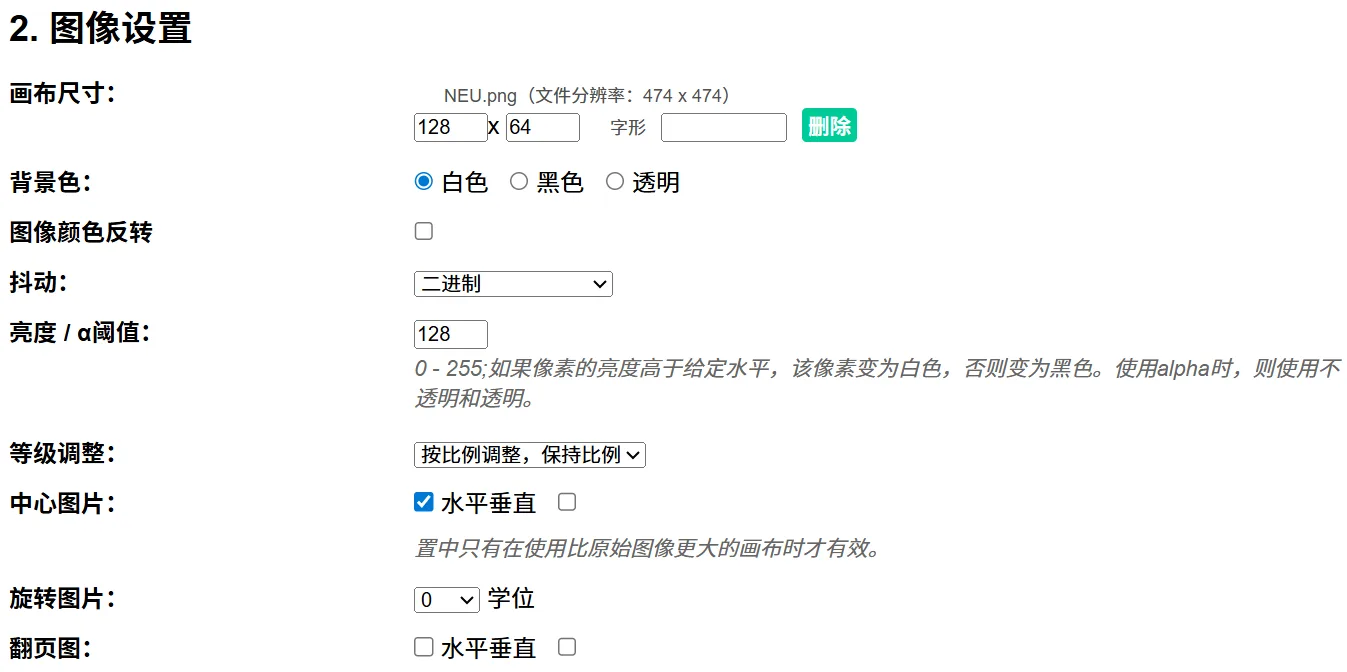
网址
https://javl.github.io/image2cpp/
上传图片后,画布尺寸输入“128 x 64”,按比例调整,保持比例,中心图片
输出格式,选择“纯字节”,生成代码
OLED_DrawBitmap
// @简介:绘制位图
void OLED_DrawBitmap(OLED_TypeDef *OLED, u16 Width, u16 Hight, u8 *pBitmap);
示例代码
const uint8_t bitmap[] = {...};  // 位图数据(实际为图片的点阵数组)

// 设置光标到原点
OLED_SetCursor(&oled, 0, 0);
// 绘制位图 128x64
OLED_DrawBitmap(&oled, 128, 64, bitmap);
功能说明
OLED_DrawBitmap:以当前光标位置为左上角,绘制指定宽度、高度的位图,位图的点阵数据由pBitmap指针指向。OLED_SetCursor(&oled, 0, 0):将光标移动到屏幕原点(左上角),为全屏绘制位图做准备。- 示例效果:在 128×64 分辨率的 OLED 屏幕上全屏显示一张位图图片。
实验代码
#include "stm32f10x.h"
#include "si2c.h"
#include "oled.h"
#include "simsunb16.h"

SI2C_TypeDef si2c;
OLED_TypeDef oled;
const uint8_t bitmap[] = {// 'NEU', 128x64px
0xff, 0xff, 0xff, 0xff, 0xff, 0xff, 0xff, 0xf0, 0x0f, 0xff, 0xff, 0xff, 0xff, 0xff, 0xff, 0xff,
0xff, 0xff, 0xff, 0xff, 0xff, 0xff, 0xfe, 0x7f, 0xfe, 0x7f, 0xff, 0xff, 0xff, 0xff, 0xff, 0xff,
0xff, 0xff, 0xff, 0xff, 0xff, 0xff, 0xf7, 0xff, 0xff, 0xef, 0xff, 0xff, 0xff, 0xff, 0xff, 0xff,
0xff, 0xff, 0xff, 0xff, 0xff, 0xff, 0xdf, 0xff, 0xff, 0xfb, 0xff, 0xff, 0xff, 0xff, 0xff, 0xff,
0xff, 0xff, 0xff, 0xff, 0xff, 0xff, 0x7f, 0xff, 0xff, 0xfe, 0xff, 0xff, 0xff, 0xff, 0xff, 0xff,
0xff, 0xff, 0xff, 0xff, 0xff, 0xfd, 0xff, 0xbf, 0xfc, 0xff, 0xbf, 0xff, 0xff, 0xff, 0xff, 0xff,
0xff, 0xff, 0xff, 0xff, 0xff, 0xff, 0xff, 0xbf, 0xfd, 0xff, 0xff, 0xff, 0xff, 0xff, 0xff, 0xff,
0xff, 0xff, 0xff, 0xff, 0xff, 0xff, 0xff, 0xff, 0xff, 0xff, 0xff, 0xff, 0xff, 0xff, 0xff, 0xff,
0xff, 0xff, 0xff, 0xff, 0xff, 0xdf, 0xff, 0xff, 0xff, 0xff, 0xff, 0xff, 0xff, 0xff, 0xff, 0xff,
0xff, 0xff, 0xff, 0xff, 0xff, 0xbd, 0xff, 0xff, 0xff, 0xff, 0xdd, 0xff, 0xff, 0xff, 0xff, 0xff,
0xff, 0xff, 0xff, 0xff, 0xff, 0x7f, 0xff, 0xdf, 0xfb, 0xff, 0xae, 0xff, 0xff, 0xff, 0xff, 0xff,
0xff, 0xff, 0xff, 0xff, 0xff, 0xff, 0xfe, 0xf8, 0x1f, 0x7f, 0x6f, 0xff, 0xff, 0xff, 0xff, 0xff,
0xff, 0xff, 0xff, 0xff, 0xff, 0xff, 0xff, 0x80, 0x01, 0xff, 0x7f, 0xff, 0xff, 0xff, 0xff, 0xff,
0xff, 0xff, 0xff, 0xff, 0xff, 0xff, 0xfe, 0x00, 0x00, 0x7f, 0xff, 0xbf, 0xff, 0xff, 0xff, 0xff,
0xff, 0xff, 0xff, 0xff, 0xfb, 0xff, 0xf8, 0x00, 0x00, 0x1f, 0xff, 0xdf, 0xff, 0xff, 0xff, 0xff,
0xff, 0xff, 0xff, 0xff, 0xff, 0xff, 0xf0, 0x00, 0x00, 0x0f, 0xff, 0xff, 0xff, 0xff, 0xff, 0xff,
0xff, 0xff, 0xff, 0xff, 0xf7, 0xff, 0xc0, 0x00, 0x80, 0x03, 0xff, 0xef, 0xff, 0xff, 0xff, 0xff,
0xff, 0xff, 0xff, 0xff, 0xff, 0xff, 0x80, 0x01, 0x80, 0x01, 0xff, 0xff, 0xff, 0xff, 0xff, 0xff,
0xff, 0xff, 0xff, 0xff, 0xef, 0xff, 0x00, 0x01, 0xc0, 0x00, 0xff, 0xf7, 0xff, 0xff, 0xff, 0xff,
0xff, 0xff, 0xff, 0xff, 0xff, 0xff, 0x01, 0x03, 0xe0, 0xc0, 0xff, 0xff, 0xff, 0xff, 0xff, 0xff,
0xff, 0xff, 0xff, 0xff, 0xdf, 0xfe, 0x03, 0x83, 0xe1, 0xc0, 0x7f, 0xfb, 0xff, 0xff, 0xff, 0xff,
0xff, 0xff, 0xff, 0xff, 0xff, 0xfc, 0x03, 0xc7, 0xf3, 0xe0, 0x3f, 0xff, 0xff, 0xff, 0xff, 0xff,
0xff, 0xff, 0xff, 0xff, 0xff, 0xfc, 0x07, 0xef, 0xf7, 0xf0, 0x3f, 0xff, 0xff, 0xff, 0xff, 0xff,
0xff, 0xff, 0xff, 0xff, 0xbb, 0xe8, 0x0f, 0xff, 0xff, 0xf0, 0x17, 0xfd, 0xff, 0xff, 0xff, 0xff,
0xff, 0xff, 0xff, 0xff, 0xbf, 0xf8, 0x0f, 0xff, 0xff, 0xf8, 0x1f, 0xfd, 0xff, 0xff, 0xff, 0xff,
0xff, 0xff, 0xff, 0xff, 0xff, 0xf0, 0x1f, 0xff, 0xff, 0xfc, 0x0f, 0xff, 0xff, 0xff, 0xff, 0xff,
0xff, 0xff, 0xff, 0xff, 0xff, 0xd0, 0x3f, 0xff, 0xff, 0xfc, 0x0b, 0x9f, 0xff, 0xff, 0xff, 0xff,
0xff, 0xff, 0xff, 0xff, 0xff, 0xf0, 0x3f, 0xff, 0xff, 0xfe, 0x0f, 0xff, 0xff, 0xff, 0xff, 0xff,
0xff, 0xff, 0xff, 0xff, 0x7f, 0xf0, 0x7f, 0xff, 0xff, 0xff, 0x0f, 0xfe, 0xff, 0xff, 0xff, 0xff,
0xff, 0xff, 0xff, 0xff, 0x7f, 0xe0, 0xff, 0xff, 0xff, 0xff, 0x07, 0xfe, 0xff, 0xff, 0xff, 0xff,
0xff, 0xff, 0xff, 0xff, 0x7f, 0xe1, 0xff, 0xff, 0xff, 0xff, 0x87, 0xfe, 0xff, 0xff, 0xff, 0xff,
0xff, 0xff, 0xff, 0xff, 0x7f, 0xe1, 0xff, 0xff, 0xff, 0xff, 0xc7, 0xfe, 0xff, 0xff, 0xff, 0xff,
0xff, 0xff, 0xff, 0xff, 0x7f, 0xe3, 0xff, 0xff, 0xff, 0xff, 0xc7, 0xfe, 0xff, 0xff, 0xff, 0xff,
0xff, 0xff, 0xff, 0xff, 0x7f, 0xe7, 0xff, 0xff, 0xff, 0xff, 0xe7, 0xfe, 0xff, 0xff, 0xff, 0xff,
0xff, 0xff, 0xff, 0xff, 0x7f, 0xe7, 0xff, 0xff, 0xff, 0xff, 0xf7, 0xf6, 0xff, 0xff, 0xff, 0xff,
0xff, 0xff, 0xff, 0xff, 0x7f, 0xff, 0xfc, 0xff, 0xff, 0xff, 0xff, 0xff, 0xff, 0xff, 0xff, 0xff,
0xff, 0xff, 0xff, 0xff, 0xff, 0xff, 0x80, 0x03, 0xff, 0xff, 0xfb, 0xff, 0xff, 0xff, 0xff, 0xff,
0xff, 0xff, 0xff, 0xff, 0xff, 0xde, 0x07, 0xc0, 0x7f, 0xff, 0xfb, 0xbf, 0xff, 0xff, 0xff, 0xff,
0xff, 0xff, 0xff, 0xff, 0xff, 0xf8, 0x7f, 0xfe, 0x1f, 0xff, 0x8f, 0xff, 0xff, 0xff, 0xff, 0xff,
0xff, 0xff, 0xff, 0xff, 0xbb, 0xf9, 0xe0, 0x07, 0x80, 0x60, 0x1f, 0x9d, 0xff, 0xff, 0xff, 0xff,
0xff, 0xff, 0xff, 0xff, 0xbf, 0xef, 0x80, 0x00, 0xf0, 0x00, 0x77, 0xff, 0xff, 0xff, 0xff, 0xff,
0xff, 0xff, 0xff, 0xff, 0xff, 0xfe, 0x0f, 0xf8, 0x3f, 0xff, 0xff, 0xff, 0xff, 0xff, 0xff, 0xff,
0xff, 0xff, 0xff, 0xff, 0xdf, 0xfc, 0x7f, 0xff, 0x0f, 0xff, 0x3f, 0xfb, 0xff, 0xff, 0xff, 0xff,
0xff, 0xff, 0xff, 0xff, 0xdf, 0xff, 0xe0, 0x03, 0x00, 0x00, 0x7f, 0xfb, 0xff, 0xff, 0xff, 0xff,
0xff, 0xff, 0xff, 0xff, 0xff, 0xff, 0x80, 0x00, 0xb8, 0x00, 0xff, 0xff, 0xff, 0xff, 0xff, 0xff,
0xff, 0xff, 0xff, 0xff, 0xef, 0xdf, 0x0f, 0xfc, 0x1f, 0xff, 0xff, 0xf7, 0xff, 0xff, 0xff, 0xff,
0xff, 0xff, 0xff, 0xff, 0xff, 0x9e, 0xbe, 0x0f, 0x81, 0xff, 0xff, 0xff, 0xff, 0xff, 0xff, 0xff,
0xff, 0xff, 0xff, 0xff, 0xf7, 0x3f, 0x70, 0x01, 0xc0, 0x06, 0xfb, 0xef, 0xff, 0xff, 0xff, 0xff,
0xff, 0xff, 0xff, 0xff, 0xff, 0xff, 0xb0, 0x00, 0x5f, 0xef, 0xff, 0xff, 0xff, 0xff, 0xff, 0xff,
0xff, 0xff, 0xff, 0xff, 0xff, 0xff, 0xf8, 0x00, 0x0f, 0xff, 0xff, 0xff, 0xff, 0xff, 0xff, 0xff,
0xff, 0xff, 0xff, 0xff, 0xfd, 0xff, 0xfe, 0x00, 0x00, 0x7f, 0xff, 0xbf, 0xff, 0xff, 0xff, 0xff,
0xff, 0xff, 0xff, 0xff, 0xfe, 0xff, 0xff, 0xc0, 0x03, 0xff, 0xff, 0x7f, 0xff, 0xff, 0xff, 0xff,
0xff, 0xff, 0xff, 0xff, 0xff, 0x7f, 0xff, 0x7f, 0xfe, 0xfe, 0xff, 0xff, 0xff, 0xff, 0xff, 0xff,
0xff, 0xff, 0xff, 0xff, 0xff, 0xfe, 0xbf, 0xe7, 0xe7, 0xff, 0xff, 0xff, 0xff, 0xff, 0xff, 0xff,
0xff, 0xff, 0xff, 0xff, 0xff, 0xff, 0xff, 0xff, 0xff, 0xfb, 0xfb, 0xff, 0xff, 0xff, 0xff, 0xff,
0xff, 0xff, 0xff, 0xff, 0xff, 0xef, 0xff, 0xff, 0xff, 0xff, 0xf7, 0xff, 0xff, 0xff, 0xff, 0xff,
0xff, 0xff, 0xff, 0xff, 0xff, 0xf7, 0xff, 0xff, 0xff, 0xff, 0xef, 0xff, 0xff, 0xff, 0xff, 0xff,
0xff, 0xff, 0xff, 0xff, 0xff, 0xfb, 0xff, 0xff, 0xff, 0xff, 0xdf, 0xff, 0xff, 0xff, 0xff, 0xff,
0xff, 0xff, 0xff, 0xff, 0xff, 0xfe, 0xff, 0xff, 0xff, 0xff, 0x7f, 0xff, 0xff, 0xff, 0xff, 0xff,
0xff, 0xff, 0xff, 0xff, 0xff, 0xff, 0x3f, 0xdf, 0xff, 0xfc, 0xff, 0xff, 0xff, 0xff, 0xff, 0xff,
0xff, 0xff, 0xff, 0xff, 0xff, 0xff, 0xcf, 0xff, 0xff, 0xf3, 0xff, 0xff, 0xff, 0xff, 0xff, 0xff,
0xff, 0xff, 0xff, 0xff, 0xff, 0xff, 0xfb, 0xff, 0xff, 0xdf, 0xff, 0xff, 0xff, 0xff, 0xff, 0xff,
0xff, 0xff, 0xff, 0xff, 0xff, 0xff, 0xff, 0x3f, 0xfd, 0xff, 0xff, 0xff, 0xff, 0xff, 0xff, 0xff,
0xff, 0xff, 0xff, 0xff, 0xff, 0xff, 0xff, 0xff, 0xff, 0xff, 0xff, 0xff, 0xff, 0xff, 0xff, 0xff};  // 位图数据(实际为图片的点阵数组)

void My_SoftwareI2C_Init(void);
void My_OLEDScreen_Init(void);
int i2c_write_bytes(uint8_t addr, const uint8_t *pdata, uint16_t size);

int main(void)
{
    My_SoftwareI2C_Init(); // 对软I2C进行初始化
    My_OLEDScreen_Init(); // 对OLED显示器进行初始化

    // #8. 绘制位图
    // 设置光标到原点
    OLED_SetCursor(&oled, 0, 0);
    // 绘制位图 128x64
    OLED_DrawBitmap(&oled, 128, 64, bitmap);

    OLED_SendBuffer(&oled);

    while(1)
    {
    }
}

void My_SoftwareI2C_Init(void)
{
    si2c.SCL_GPIOx = GPIOB;
    si2c.SCL_GPIO_Pin = GPIO_Pin_6;
    si2c.SDA_GPIOx = GPIOB;
    si2c.SDA_GPIO_Pin = GPIO_Pin_7;

    My_SI2C_Init(&si2c);
}

int i2c_write_bytes(uint8_t addr, const uint8_t *pdata, uint16_t size)
{
    return My_SI2C_SendBytes(&si2c, addr, pdata, size);
}

void My_OLEDScreen_Init(void)
{
    OLED_InitTypeDef OLED_InitStruct;

    OLED_InitStruct.i2c_write_cb = i2c_write_bytes;

    OLED_Init(&oled, &OLED_InitStruct);
}
#include "stm32f10x.h"
#include "si2c.h"
#include "oled.h"
#include "simsunb16.h"
#include "delay.h"
SI2C_TypeDef si2c;
OLED_TypeDef oled;
const uint8_t bitmap[] = {// 'NEU', 128x64px
0xff, 0xff, 0xff, 0xff, 0xff, 0xff, 0xff, 0xf0, 0x0f, 0xff, 0xff, 0xff, 0xff, 0xff, 0xff, 0xff,
0xff, 0xff, 0xff, 0xff, 0xff, 0xff, 0xfe, 0x7f, 0xfe, 0x7f, 0xff, 0xff, 0xff, 0xff, 0xff, 0xff,
0xff, 0xff, 0xff, 0xff, 0xff, 0xff, 0xf7, 0xff, 0xff, 0xef, 0xff, 0xff, 0xff, 0xff, 0xff, 0xff,
0xff, 0xff, 0xff, 0xff, 0xff, 0xff, 0xdf, 0xff, 0xff, 0xfb, 0xff, 0xff, 0xff, 0xff, 0xff, 0xff,
0xff, 0xff, 0xff, 0xff, 0xff, 0xff, 0x7f, 0xff, 0xff, 0xfe, 0xff, 0xff, 0xff, 0xff, 0xff, 0xff,
0xff, 0xff, 0xff, 0xff, 0xff, 0xfd, 0xff, 0xbf, 0xfc, 0xff, 0xbf, 0xff, 0xff, 0xff, 0xff, 0xff,
0xff, 0xff, 0xff, 0xff, 0xff, 0xff, 0xff, 0xbf, 0xfd, 0xff, 0xff, 0xff, 0xff, 0xff, 0xff, 0xff,
0xff, 0xff, 0xff, 0xff, 0xff, 0xff, 0xff, 0xff, 0xff, 0xff, 0xff, 0xff, 0xff, 0xff, 0xff, 0xff,
0xff, 0xff, 0xff, 0xff, 0xff, 0xdf, 0xff, 0xff, 0xff, 0xff, 0xff, 0xff, 0xff, 0xff, 0xff, 0xff,
0xff, 0xff, 0xff, 0xff, 0xff, 0xbd, 0xff, 0xff, 0xff, 0xff, 0xdd, 0xff, 0xff, 0xff, 0xff, 0xff,
0xff, 0xff, 0xff, 0xff, 0xff, 0x7f, 0xff, 0xdf, 0xfb, 0xff, 0xae, 0xff, 0xff, 0xff, 0xff, 0xff,
0xff, 0xff, 0xff, 0xff, 0xff, 0xff, 0xfe, 0xf8, 0x1f, 0x7f, 0x6f, 0xff, 0xff, 0xff, 0xff, 0xff,
0xff, 0xff, 0xff, 0xff, 0xff, 0xff, 0xff, 0x80, 0x01, 0xff, 0x7f, 0xff, 0xff, 0xff, 0xff, 0xff,
0xff, 0xff, 0xff, 0xff, 0xff, 0xff, 0xfe, 0x00, 0x00, 0x7f, 0xff, 0xbf, 0xff, 0xff, 0xff, 0xff,
0xff, 0xff, 0xff, 0xff, 0xfb, 0xff, 0xf8, 0x00, 0x00, 0x1f, 0xff, 0xdf, 0xff, 0xff, 0xff, 0xff,
0xff, 0xff, 0xff, 0xff, 0xff, 0xff, 0xf0, 0x00, 0x00, 0x0f, 0xff, 0xff, 0xff, 0xff, 0xff, 0xff,
0xff, 0xff, 0xff, 0xff, 0xf7, 0xff, 0xc0, 0x00, 0x80, 0x03, 0xff, 0xef, 0xff, 0xff, 0xff, 0xff,
0xff, 0xff, 0xff, 0xff, 0xff, 0xff, 0x80, 0x01, 0x80, 0x01, 0xff, 0xff, 0xff, 0xff, 0xff, 0xff,
0xff, 0xff, 0xff, 0xff, 0xef, 0xff, 0x00, 0x01, 0xc0, 0x00, 0xff, 0xf7, 0xff, 0xff, 0xff, 0xff,
0xff, 0xff, 0xff, 0xff, 0xff, 0xff, 0x01, 0x03, 0xe0, 0xc0, 0xff, 0xff, 0xff, 0xff, 0xff, 0xff,
0xff, 0xff, 0xff, 0xff, 0xdf, 0xfe, 0x03, 0x83, 0xe1, 0xc0, 0x7f, 0xfb, 0xff, 0xff, 0xff, 0xff,
0xff, 0xff, 0xff, 0xff, 0xff, 0xfc, 0x03, 0xc7, 0xf3, 0xe0, 0x3f, 0xff, 0xff, 0xff, 0xff, 0xff,
0xff, 0xff, 0xff, 0xff, 0xff, 0xfc, 0x07, 0xef, 0xf7, 0xf0, 0x3f, 0xff, 0xff, 0xff, 0xff, 0xff,
0xff, 0xff, 0xff, 0xff, 0xbb, 0xe8, 0x0f, 0xff, 0xff, 0xf0, 0x17, 0xfd, 0xff, 0xff, 0xff, 0xff,
0xff, 0xff, 0xff, 0xff, 0xbf, 0xf8, 0x0f, 0xff, 0xff, 0xf8, 0x1f, 0xfd, 0xff, 0xff, 0xff, 0xff,
0xff, 0xff, 0xff, 0xff, 0xff, 0xf0, 0x1f, 0xff, 0xff, 0xfc, 0x0f, 0xff, 0xff, 0xff, 0xff, 0xff,
0xff, 0xff, 0xff, 0xff, 0xff, 0xd0, 0x3f, 0xff, 0xff, 0xfc, 0x0b, 0x9f, 0xff, 0xff, 0xff, 0xff,
0xff, 0xff, 0xff, 0xff, 0xff, 0xf0, 0x3f, 0xff, 0xff, 0xfe, 0x0f, 0xff, 0xff, 0xff, 0xff, 0xff,
0xff, 0xff, 0xff, 0xff, 0x7f, 0xf0, 0x7f, 0xff, 0xff, 0xff, 0x0f, 0xfe, 0xff, 0xff, 0xff, 0xff,
0xff, 0xff, 0xff, 0xff, 0x7f, 0xe0, 0xff, 0xff, 0xff, 0xff, 0x07, 0xfe, 0xff, 0xff, 0xff, 0xff,
0xff, 0xff, 0xff, 0xff, 0x7f, 0xe1, 0xff, 0xff, 0xff, 0xff, 0x87, 0xfe, 0xff, 0xff, 0xff, 0xff,
0xff, 0xff, 0xff, 0xff, 0x7f, 0xe1, 0xff, 0xff, 0xff, 0xff, 0xc7, 0xfe, 0xff, 0xff, 0xff, 0xff,
0xff, 0xff, 0xff, 0xff, 0x7f, 0xe3, 0xff, 0xff, 0xff, 0xff, 0xc7, 0xfe, 0xff, 0xff, 0xff, 0xff,
0xff, 0xff, 0xff, 0xff, 0x7f, 0xe7, 0xff, 0xff, 0xff, 0xff, 0xe7, 0xfe, 0xff, 0xff, 0xff, 0xff,
0xff, 0xff, 0xff, 0xff, 0x7f, 0xe7, 0xff, 0xff, 0xff, 0xff, 0xf7, 0xf6, 0xff, 0xff, 0xff, 0xff,
0xff, 0xff, 0xff, 0xff, 0x7f, 0xff, 0xfc, 0xff, 0xff, 0xff, 0xff, 0xff, 0xff, 0xff, 0xff, 0xff,
0xff, 0xff, 0xff, 0xff, 0xff, 0xff, 0x80, 0x03, 0xff, 0xff, 0xfb, 0xff, 0xff, 0xff, 0xff, 0xff,
0xff, 0xff, 0xff, 0xff, 0xff, 0xde, 0x07, 0xc0, 0x7f, 0xff, 0xfb, 0xbf, 0xff, 0xff, 0xff, 0xff,
0xff, 0xff, 0xff, 0xff, 0xff, 0xf8, 0x7f, 0xfe, 0x1f, 0xff, 0x8f, 0xff, 0xff, 0xff, 0xff, 0xff,
0xff, 0xff, 0xff, 0xff, 0xbb, 0xf9, 0xe0, 0x07, 0x80, 0x60, 0x1f, 0x9d, 0xff, 0xff, 0xff, 0xff,
0xff, 0xff, 0xff, 0xff, 0xbf, 0xef, 0x80, 0x00, 0xf0, 0x00, 0x77, 0xff, 0xff, 0xff, 0xff, 0xff,
0xff, 0xff, 0xff, 0xff, 0xff, 0xfe, 0x0f, 0xf8, 0x3f, 0xff, 0xff, 0xff, 0xff, 0xff, 0xff, 0xff,
0xff, 0xff, 0xff, 0xff, 0xdf, 0xfc, 0x7f, 0xff, 0x0f, 0xff, 0x3f, 0xfb, 0xff, 0xff, 0xff, 0xff,
0xff, 0xff, 0xff, 0xff, 0xdf, 0xff, 0xe0, 0x03, 0x00, 0x00, 0x7f, 0xfb, 0xff, 0xff, 0xff, 0xff,
0xff, 0xff, 0xff, 0xff, 0xff, 0xff, 0x80, 0x00, 0xb8, 0x00, 0xff, 0xff, 0xff, 0xff, 0xff, 0xff,
0xff, 0xff, 0xff, 0xff, 0xef, 0xdf, 0x0f, 0xfc, 0x1f, 0xff, 0xff, 0xf7, 0xff, 0xff, 0xff, 0xff,
0xff, 0xff, 0xff, 0xff, 0xff, 0x9e, 0xbe, 0x0f, 0x81, 0xff, 0xff, 0xff, 0xff, 0xff, 0xff, 0xff,
0xff, 0xff, 0xff, 0xff, 0xf7, 0x3f, 0x70, 0x01, 0xc0, 0x06, 0xfb, 0xef, 0xff, 0xff, 0xff, 0xff,
0xff, 0xff, 0xff, 0xff, 0xff, 0xff, 0xb0, 0x00, 0x5f, 0xef, 0xff, 0xff, 0xff, 0xff, 0xff, 0xff,
0xff, 0xff, 0xff, 0xff, 0xff, 0xff, 0xf8, 0x00, 0x0f, 0xff, 0xff, 0xff, 0xff, 0xff, 0xff, 0xff,
0xff, 0xff, 0xff, 0xff, 0xfd, 0xff, 0xfe, 0x00, 0x00, 0x7f, 0xff, 0xbf, 0xff, 0xff, 0xff, 0xff,
0xff, 0xff, 0xff, 0xff, 0xfe, 0xff, 0xff, 0xc0, 0x03, 0xff, 0xff, 0x7f, 0xff, 0xff, 0xff, 0xff,
0xff, 0xff, 0xff, 0xff, 0xff, 0x7f, 0xff, 0x7f, 0xfe, 0xfe, 0xff, 0xff, 0xff, 0xff, 0xff, 0xff,
0xff, 0xff, 0xff, 0xff, 0xff, 0xfe, 0xbf, 0xe7, 0xe7, 0xff, 0xff, 0xff, 0xff, 0xff, 0xff, 0xff,
0xff, 0xff, 0xff, 0xff, 0xff, 0xff, 0xff, 0xff, 0xff, 0xfb, 0xfb, 0xff, 0xff, 0xff, 0xff, 0xff,
0xff, 0xff, 0xff, 0xff, 0xff, 0xef, 0xff, 0xff, 0xff, 0xff, 0xf7, 0xff, 0xff, 0xff, 0xff, 0xff,
0xff, 0xff, 0xff, 0xff, 0xff, 0xf7, 0xff, 0xff, 0xff, 0xff, 0xef, 0xff, 0xff, 0xff, 0xff, 0xff,
0xff, 0xff, 0xff, 0xff, 0xff, 0xfb, 0xff, 0xff, 0xff, 0xff, 0xdf, 0xff, 0xff, 0xff, 0xff, 0xff,
0xff, 0xff, 0xff, 0xff, 0xff, 0xfe, 0xff, 0xff, 0xff, 0xff, 0x7f, 0xff, 0xff, 0xff, 0xff, 0xff,
0xff, 0xff, 0xff, 0xff, 0xff, 0xff, 0x3f, 0xdf, 0xff, 0xfc, 0xff, 0xff, 0xff, 0xff, 0xff, 0xff,
0xff, 0xff, 0xff, 0xff, 0xff, 0xff, 0xcf, 0xff, 0xff, 0xf3, 0xff, 0xff, 0xff, 0xff, 0xff, 0xff,
0xff, 0xff, 0xff, 0xff, 0xff, 0xff, 0xfb, 0xff, 0xff, 0xdf, 0xff, 0xff, 0xff, 0xff, 0xff, 0xff,
0xff, 0xff, 0xff, 0xff, 0xff, 0xff, 0xff, 0x3f, 0xfd, 0xff, 0xff, 0xff, 0xff, 0xff, 0xff, 0xff,
0xff, 0xff, 0xff, 0xff, 0xff, 0xff, 0xff, 0xff, 0xff, 0xff, 0xff, 0xff, 0xff, 0xff, 0xff, 0xff}; // 位图数据(实际为图片的点阵数组)
const uint8_t bitmapFlip[] = {// 'NEU', 128x64px
0xff, 0xff, 0xff, 0xff, 0xff, 0xff, 0xff, 0xf0, 0x0f, 0xff, 0xff, 0xff, 0xff, 0xff, 0xff, 0xff,
0xff, 0xff, 0xff, 0xff, 0xff, 0xff, 0xfe, 0x7f, 0xfe, 0x7f, 0xff, 0xff, 0xff, 0xff, 0xff, 0xff,
0xff, 0xff, 0xff, 0xff, 0xff, 0xff, 0xf7, 0xff, 0xff, 0xef, 0xff, 0xff, 0xff, 0xff, 0xff, 0xff,
0xff, 0xff, 0xff, 0xff, 0xff, 0xff, 0xdf, 0xff, 0xff, 0xfb, 0xff, 0xff, 0xff, 0xff, 0xff, 0xff,
0xff, 0xff, 0xff, 0xff, 0xff, 0xff, 0x7f, 0xff, 0xff, 0xfe, 0xff, 0xff, 0xff, 0xff, 0xff, 0xff,
0xff, 0xff, 0xff, 0xff, 0xff, 0xfd, 0xff, 0x3f, 0xfd, 0xff, 0xbf, 0xff, 0xff, 0xff, 0xff, 0xff,
0xff, 0xff, 0xff, 0xff, 0xff, 0xff, 0xff, 0xbf, 0xfd, 0xff, 0xff, 0xff, 0xff, 0xff, 0xff, 0xff,
0xff, 0xff, 0xff, 0xff, 0xff, 0xff, 0xff, 0xff, 0xff, 0xff, 0xff, 0xff, 0xff, 0xff, 0xff, 0xff,
0xff, 0xff, 0xff, 0xff, 0xff, 0xff, 0xff, 0xff, 0xff, 0xff, 0xfb, 0xff, 0xff, 0xff, 0xff, 0xff,
0xff, 0xff, 0xff, 0xff, 0xff, 0xbb, 0xff, 0xff, 0xff, 0xff, 0xbd, 0xff, 0xff, 0xff, 0xff, 0xff,
0xff, 0xff, 0xff, 0xff, 0xff, 0x75, 0xff, 0xdf, 0xfb, 0xff, 0xfe, 0xff, 0xff, 0xff, 0xff, 0xff,
0xff, 0xff, 0xff, 0xff, 0xff, 0xf6, 0xfe, 0xf8, 0x1f, 0x7f, 0xff, 0xff, 0xff, 0xff, 0xff, 0xff,
0xff, 0xff, 0xff, 0xff, 0xff, 0xfe, 0xff, 0x80, 0x01, 0xff, 0xff, 0xff, 0xff, 0xff, 0xff, 0xff,
0xff, 0xff, 0xff, 0xff, 0xfd, 0xff, 0xfe, 0x00, 0x00, 0x7f, 0xff, 0xff, 0xff, 0xff, 0xff, 0xff,
0xff, 0xff, 0xff, 0xff, 0xfb, 0xff, 0xf8, 0x00, 0x00, 0x1f, 0xff, 0xdf, 0xff, 0xff, 0xff, 0xff,
0xff, 0xff, 0xff, 0xff, 0xff, 0xff, 0xf0, 0x00, 0x00, 0x0f, 0xff, 0xff, 0xff, 0xff, 0xff, 0xff,
0xff, 0xff, 0xff, 0xff, 0xf7, 0xff, 0xc0, 0x01, 0x00, 0x03, 0xff, 0xef, 0xff, 0xff, 0xff, 0xff,
0xff, 0xff, 0xff, 0xff, 0xff, 0xff, 0x80, 0x01, 0x80, 0x01, 0xff, 0xff, 0xff, 0xff, 0xff, 0xff,
0xff, 0xff, 0xff, 0xff, 0xef, 0xff, 0x00, 0x03, 0x80, 0x00, 0xff, 0xf7, 0xff, 0xff, 0xff, 0xff,
0xff, 0xff, 0xff, 0xff, 0xff, 0xff, 0x03, 0x07, 0xc0, 0x80, 0xff, 0xff, 0xff, 0xff, 0xff, 0xff,
0xff, 0xff, 0xff, 0xff, 0xdf, 0xfe, 0x03, 0x87, 0xc1, 0xc0, 0x7f, 0xfb, 0xff, 0xff, 0xff, 0xff,
0xff, 0xff, 0xff, 0xff, 0xff, 0xfc, 0x07, 0xcf, 0xe3, 0xc0, 0x3f, 0xff, 0xff, 0xff, 0xff, 0xff,
0xff, 0xff, 0xff, 0xff, 0xff, 0xfc, 0x0f, 0xef, 0xf7, 0xe0, 0x3f, 0xff, 0xff, 0xff, 0xff, 0xff,
0xff, 0xff, 0xff, 0xff, 0xbf, 0xe8, 0x0f, 0xff, 0xff, 0xf0, 0x17, 0xdd, 0xff, 0xff, 0xff, 0xff,
0xff, 0xff, 0xff, 0xff, 0xbf, 0xf8, 0x1f, 0xff, 0xff, 0xf0, 0x1f, 0xfd, 0xff, 0xff, 0xff, 0xff,
0xff, 0xff, 0xff, 0xff, 0xff, 0xf0, 0x3f, 0xff, 0xff, 0xf8, 0x0f, 0xff, 0xff, 0xff, 0xff, 0xff,
0xff, 0xff, 0xff, 0xff, 0xf9, 0xd0, 0x3f, 0xff, 0xff, 0xfc, 0x0b, 0xff, 0xff, 0xff, 0xff, 0xff,
0xff, 0xff, 0xff, 0xff, 0xff, 0xf0, 0x7f, 0xff, 0xff, 0xfc, 0x0f, 0xff, 0xff, 0xff, 0xff, 0xff,
0xff, 0xff, 0xff, 0xff, 0x7f, 0xf0, 0xff, 0xff, 0xff, 0xfe, 0x0f, 0xfe, 0xff, 0xff, 0xff, 0xff,
0xff, 0xff, 0xff, 0xff, 0x7f, 0xe0, 0xff, 0xff, 0xff, 0xff, 0x07, 0xfe, 0xff, 0xff, 0xff, 0xff,
0xff, 0xff, 0xff, 0xff, 0x7f, 0xe1, 0xff, 0xff, 0xff, 0xff, 0x87, 0xfe, 0xff, 0xff, 0xff, 0xff,
0xff, 0xff, 0xff, 0xff, 0x7f, 0xe3, 0xff, 0xff, 0xff, 0xff, 0x87, 0xfe, 0xff, 0xff, 0xff, 0xff,
0xff, 0xff, 0xff, 0xff, 0x7f, 0xe3, 0xff, 0xff, 0xff, 0xff, 0xc7, 0xfe, 0xff, 0xff, 0xff, 0xff,
0xff, 0xff, 0xff, 0xff, 0x7f, 0xe7, 0xff, 0xff, 0xff, 0xff, 0xe7, 0xfe, 0xff, 0xff, 0xff, 0xff,
0xff, 0xff, 0xff, 0xff, 0x6f, 0xef, 0xff, 0xff, 0xff, 0xff, 0xe7, 0xfe, 0xff, 0xff, 0xff, 0xff,
0xff, 0xff, 0xff, 0xff, 0xff, 0xff, 0xff, 0xff, 0xff, 0x3f, 0xff, 0xfe, 0xff, 0xff, 0xff, 0xff,
0xff, 0xff, 0xff, 0xff, 0xff, 0xdf, 0xff, 0xff, 0xc0, 0x01, 0xff, 0xff, 0xff, 0xff, 0xff, 0xff,
0xff, 0xff, 0xff, 0xff, 0xfd, 0xdf, 0xff, 0xfe, 0x03, 0xe0, 0x7b, 0xff, 0xff, 0xff, 0xff, 0xff,
0xff, 0xff, 0xff, 0xff, 0xff, 0xf1, 0xff, 0xf8, 0x7f, 0xfe, 0x1f, 0xff, 0xff, 0xff, 0xff, 0xff,
0xff, 0xff, 0xff, 0xff, 0xb9, 0xf8, 0x06, 0x01, 0xe0, 0x07, 0x9f, 0xdd, 0xff, 0xff, 0xff, 0xff,
0xff, 0xff, 0xff, 0xff, 0xff, 0xee, 0x00, 0x0f, 0x00, 0x01, 0xf7, 0xfd, 0xff, 0xff, 0xff, 0xff,
0xff, 0xff, 0xff, 0xff, 0xff, 0xff, 0xff, 0xfc, 0x1f, 0xf0, 0x7f, 0xff, 0xff, 0xff, 0xff, 0xff,
0xff, 0xff, 0xff, 0xff, 0xdf, 0xfc, 0xff, 0xf0, 0xff, 0xfe, 0x3f, 0xfb, 0xff, 0xff, 0xff, 0xff,
0xff, 0xff, 0xff, 0xff, 0xdf, 0xfe, 0x00, 0x00, 0xc0, 0x07, 0xff, 0xfb, 0xff, 0xff, 0xff, 0xff,
0xff, 0xff, 0xff, 0xff, 0xff, 0xff, 0x00, 0x1d, 0x00, 0x01, 0xff, 0xff, 0xff, 0xff, 0xff, 0xff,
0xff, 0xff, 0xff, 0xff, 0xef, 0xff, 0xff, 0xf8, 0x3f, 0xf0, 0xfb, 0xf7, 0xff, 0xff, 0xff, 0xff,
0xff, 0xff, 0xff, 0xff, 0xff, 0xff, 0xff, 0x81, 0xf0, 0x7d, 0x79, 0xff, 0xff, 0xff, 0xff, 0xff,
0xff, 0xff, 0xff, 0xff, 0xf7, 0xdf, 0x60, 0x03, 0x80, 0x0e, 0xfc, 0xef, 0xff, 0xff, 0xff, 0xff,
0xff, 0xff, 0xff, 0xff, 0xff, 0xff, 0xf7, 0xfa, 0x00, 0x0d, 0xff, 0xff, 0xff, 0xff, 0xff, 0xff,
0xff, 0xff, 0xff, 0xff, 0xff, 0xff, 0xff, 0xf0, 0x00, 0x1f, 0xff, 0xff, 0xff, 0xff, 0xff, 0xff,
0xff, 0xff, 0xff, 0xff, 0xfd, 0xff, 0xfe, 0x00, 0x00, 0x7f, 0xff, 0xbf, 0xff, 0xff, 0xff, 0xff,
0xff, 0xff, 0xff, 0xff, 0xfe, 0xff, 0xff, 0xc0, 0x03, 0xff, 0xff, 0x7f, 0xff, 0xff, 0xff, 0xff,
0xff, 0xff, 0xff, 0xff, 0xff, 0xff, 0x7f, 0x7f, 0xfe, 0xff, 0xfe, 0xff, 0xff, 0xff, 0xff, 0xff,
0xff, 0xff, 0xff, 0xff, 0xff, 0xff, 0xff, 0xe7, 0xe7, 0xfd, 0x7f, 0xff, 0xff, 0xff, 0xff, 0xff,
0xff, 0xff, 0xff, 0xff, 0xff, 0xdf, 0xdf, 0xff, 0xff, 0xff, 0xff, 0xff, 0xff, 0xff, 0xff, 0xff,
0xff, 0xff, 0xff, 0xff, 0xff, 0xef, 0xff, 0xff, 0xff, 0xff, 0xf7, 0xff, 0xff, 0xff, 0xff, 0xff,
0xff, 0xff, 0xff, 0xff, 0xff, 0xf7, 0xff, 0xff, 0xff, 0xff, 0xef, 0xff, 0xff, 0xff, 0xff, 0xff,
0xff, 0xff, 0xff, 0xff, 0xff, 0xfb, 0xff, 0xff, 0xff, 0xff, 0xdf, 0xff, 0xff, 0xff, 0xff, 0xff,
0xff, 0xff, 0xff, 0xff, 0xff, 0xfe, 0xff, 0xff, 0xff, 0xff, 0x7f, 0xff, 0xff, 0xff, 0xff, 0xff,
0xff, 0xff, 0xff, 0xff, 0xff, 0xff, 0x3f, 0xff, 0xfb, 0xfc, 0xff, 0xff, 0xff, 0xff, 0xff, 0xff,
0xff, 0xff, 0xff, 0xff, 0xff, 0xff, 0xcf, 0xff, 0xff, 0xf3, 0xff, 0xff, 0xff, 0xff, 0xff, 0xff,
0xff, 0xff, 0xff, 0xff, 0xff, 0xff, 0xfb, 0xff, 0xff, 0xdf, 0xff, 0xff, 0xff, 0xff, 0xff, 0xff,
0xff, 0xff, 0xff, 0xff, 0xff, 0xff, 0xff, 0xbf, 0xfc, 0xff, 0xff, 0xff, 0xff, 0xff, 0xff, 0xff,
0xff, 0xff, 0xff, 0xff, 0xff, 0xff, 0xff, 0xff, 0xff, 0xff, 0xff, 0xff, 0xff, 0xff, 0xff, 0xff};
void My_SoftwareI2C_Init(void);
void My_OLEDScreen_Init(void);
int i2c_write_bytes(uint8_t addr, const uint8_t *pdata, uint16_t size);
int main(void)
{
My_SoftwareI2C_Init(); // 对软I2C进行初始化
My_OLEDScreen_Init(); // 对OLED显示器进行初始化
while(1)
{
OLED_Clear(&oled);
// 设置光标到原点
OLED_SetCursor(&oled, 0, 0);
// 绘制位图 128x64
OLED_DrawBitmap(&oled, 128, 64, bitmap);
OLED_SendBuffer(&oled);
Delay(500);
OLED_Clear(&oled);
// 设置光标到原点
OLED_SetCursor(&oled, 0, 0);
// 绘制位图 128x64
OLED_DrawBitmap(&oled, 128, 64, bitmapFlip);
OLED_SendBuffer(&oled);
Delay(500);
}
}
void My_SoftwareI2C_Init(void)
{
si2c.SCL_GPIOx = GPIOB;
si2c.SCL_GPIO_Pin = GPIO_Pin_6;
si2c.SDA_GPIOx = GPIOB;
si2c.SDA_GPIO_Pin = GPIO_Pin_7;
My_SI2C_Init(&si2c);
}
int i2c_write_bytes(uint8_t addr, const uint8_t *pdata, uint16_t size)
{
return My_SI2C_SendBytes(&si2c, addr, pdata, size);
}
void My_OLEDScreen_Init(void)
{
OLED_InitTypeDef OLED_InitStruct;
OLED_InitStruct.i2c_write_cb = i2c_write_bytes;
OLED_Init(&oled, &OLED_InitStruct);
}完整实验代码
#include "stm32f10x.h"
#include "si2c.h"
#include "oled.h"
#include "simsunb16.h"

SI2C_TypeDef si2c;
OLED_TypeDef oled;

void My_SoftwareI2C_Init(void);
void My_OLEDScreen_Init(void);
int i2c_write_bytes(uint8_t addr, const uint8_t *pdata, uint16_t size);

int main(void)
{
    My_SoftwareI2C_Init(); // 对软I2C进行初始化
    My_OLEDScreen_Init(); // 对OLED显示器进行初始化

    // #1. 打印Hello world
    OLED_SetPen(&oled, PEN_COLOR_WHITE, 1);    // 设置白画笔
    OLED_SetBrush(&oled, PEN_COLOR_TRANSPARENT); // 透明画刷
    OLED_SetCursor(&oled, 24, 50);             // 设置光标
    OLED_DrawString(&oled, "Hello world");

    // #2. 打印东北大学
    OLED_SetFont(&oled, &simsunb16);
    int16_t x = (OLED_GetScreenWidth(&oled) - OLED_GetStrWidth(&oled, "东北大学")) / 2;
    OLED_SetCursor(&oled, x, 28);
    OLED_DrawString(&oled, "东北大学");

    // #3. 格式化打印当前日期
    OLED_SetFont(&oled, &default_font);
    OLED_SetCursor(&oled, 58, 64);
    OLED_Printf(&oled, "%04d/%02d/%02d", 2026, 03, 19);

    OLED_SendBuffer(&oled);

    while(1)
    {
    }
}

void My_SoftwareI2C_Init(void)
{
    si2c.SCL_GPIOx = GPIOB;
    si2c.SCL_GPIO_Pin = GPIO_Pin_6;
    si2c.SDA_GPIOx = GPIOB;
    si2c.SDA_GPIO_Pin = GPIO_Pin_7;

    My_SI2C_Init(&si2c);
}

int i2c_write_bytes(uint8_t addr, const uint8_t *pdata, uint16_t size)
{
    return My_SI2C_SendBytes(&si2c, addr, pdata, size);
}

void My_OLEDScreen_Init(void)
{
    OLED_InitTypeDef OLED_InitStruct;

    OLED_InitStruct.i2c_write_cb = i2c_write_bytes;

    OLED_Init(&oled, &OLED_InitStruct);
}
本文由 FormerlyXZ 创作, 采用CC BY-NC-SA 4.0 许可协议。
转载请注明出处,禁止商业使用。
评论
评论由 Giscus提供。首次评论需要在评论框里登录一次 GitHub(与页头的站点登录互相独立,这是浏览器安全限制), 之后当前浏览器会记住,不用反复登录;评论框里可以直接粘贴图片、拖入 PDF 等附件(GitHub 会帮你存好)。